

When I set out to build a conversational AI, I wasn’t interested in another chatbot with a static avatar. I wanted something that felt real — an AI that speaks with synchronized lip movements, shows natural expressions, and responds in genuine real-time. After months of experimentation combining WebAudio analysis, ReadyPlayer.me avatars, and Agora’s ConvoAI platform, I figured it out.
This guide shows you how to implement real-time lip synchronization and facial expressions for 3D avatars powered by Agora’s ConvoAI Engine. You’ll learn to analyze audio streams with WebAudio API, map frequencies to ARKit viseme blend shapes, and render expressive avatars at 60 FPS using Three.js — all synchronized with Agora’s voice streaming.

Understand the tech
The breakthrough here is using WebAudio API to analyze Agora’s audio stream in real-time, then mapping frequency data directly to ARKit viseme blend shapes on a ReadyPlayer.me avatar. Here’s the flow:
- User speaks → Agora RTC captures and streams audio to ConvoAI Engine
- ConvoAI processes → Speech-to-text, LLM reasoning, text-to-speech conversion
- AI responds → TTS audio streams back through Agora RTC
- WebAudio analyzes → AnalyserNode performs FFT on audio stream (85–255 Hz speech range)
- Viseme mapping → Frequency patterns map to phoneme shapes (aa, E, I, O, U, PP, FF, etc.)
- Morph targets update → ARKit blend shapes deform at 60 FPS
- Avatar speaks → Realistic lip sync with <50ms audio-to-visual latency
Here’s the data flow:

The key insight? Human speech frequencies cluster in predictable ranges. Low frequencies (85–150 Hz) correspond to open vowels like “O” and “U”. Mid-range (150–200 Hz) maps to “A” sounds. Higher frequencies (200–255 Hz) indicate “E” and “I” sounds. Consonants create distinct spikes we detect and map to specific blend shapes (PP for bilabials, FF for labiodentals, TH for dentals, etc.).
This approach delivers convincing lip sync without machine learning models, pre-processing, or phoneme detection APIs. It’s pure browser-native audio analysis driving real-time 3D deformation.
Prerequisites
To build real-time AI avatars with lip sync using Agora, you must have:
- A valid Agora account. If you don’t have one, see Get Started with Agora
- An Agora App ID and temporary token from the Agora Console
- Agora ConvoAI API credentials (“Customer ID” and “Customer Secret”)
- Node.js 16+ and npm installed
- Basic knowledge of JavaScript and React
- An OpenAI API key or compatible LLM API
- Azure Speech Services API key for text-to-speech
- A modern web browser with WebAudio API support (Chrome, Firefox, Safari, Edge)
Project setup
To set up your development environment for building AI avatars with lip sync:
1. Clone the starter repository:
2. Install dependencies:
The project structure includes:
RPM-agora-agent/
├── src/
│   ├── components/
│   │   ├── Avatar.jsx          # 3D avatar with lip sync engine
│   │   ├── Experience.jsx      # Three.js scene configuration
│   │   ├── UI.jsx             # Main user interface
│   │   ├── Settings.jsx       # API credentials panel
│   │   └── CombinedChat.jsx   # Chat interface
│   ├── hooks/
│   │   ├── useAgora.jsx       # Agora RTC integration
│   │   ├── useChat.jsx        # ConvoAI state management
│   │   └── useLipSync.jsx     # Lip sync audio analysis
│   ├── App.jsx                # Root component
│   └── main.jsx              # Application entry point
├── public/
│   └── models/
│       └── Avatars/          # ReadyPlayer.me GLB files
└── package.json
3. Start the development server:
4. Open your browser to http://localhost:5173
You’ll see the application UI with a settings button in the top-right corner. Before we can test the avatar, you need to configure your API credentials, which we’ll do in the next section.
Build AI Avatar with Lip Sync
Building this system involves three core modules: initializing Agora RTC with ConvoAI, implementing the WebAudio-driven lip sync engine, and integrating facial expressions. Let’s build each incrementally.
Initialize Agora RTC and ConvoAI
First, we need to establish the real-time voice connection that will power our AI agent.
1. Configure your API credentials
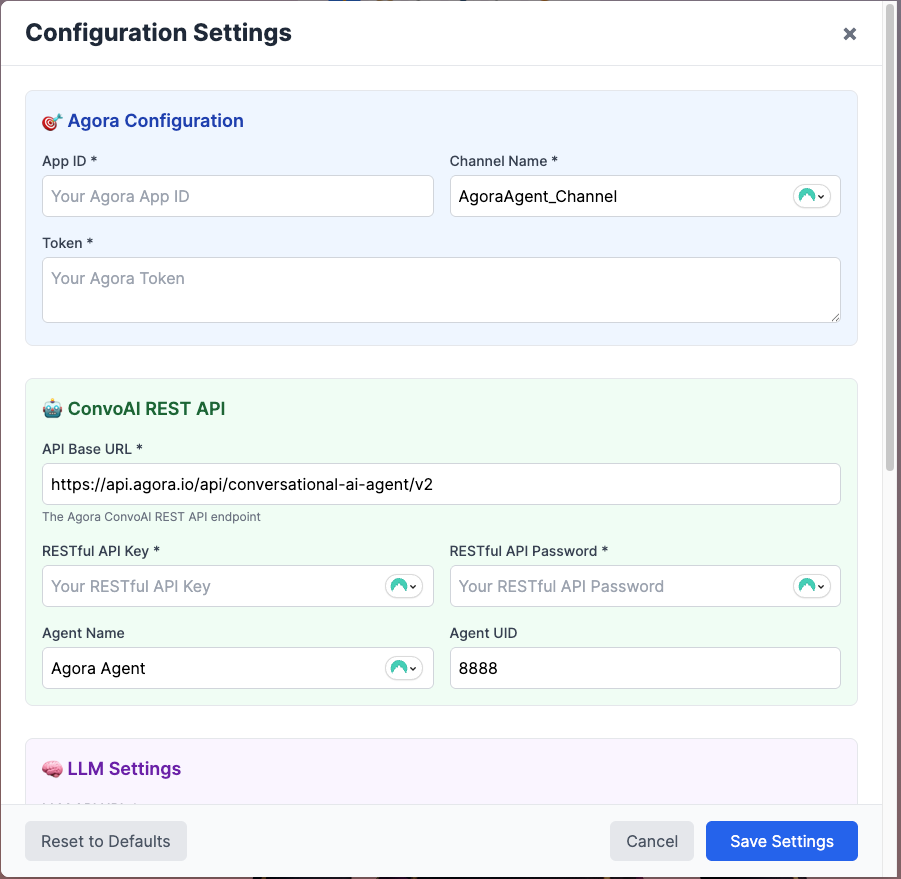
Open the application in your browser. Click the settings (☰) button in the top-right corner and enter your credentials in each tab:
- Agora Tab: App ID, Token (from console), Channel Name
- ConvoAI Tab: API Base URL, API Key, Password, Agent Name, Agent UID
- LLM Tab: OpenAI API URL, API Key, Model (gpt-4o-mini), System Message
- TTS Tab: Azure Speech API Key, Region (eastus), Voice Name (en-US-AriaNeural)
- ASR Tab: Language (en-US)
Settings persist in sessionStorage during your session.
2. Initialize the Agora RTC client
In src/hooks/useAgora.jsx, the client is created in 'live' mode with 'host' role to enable immediate two-way communication with the ConvoAI Agent.
import AgoraRTC from "agora-rtc-sdk-ng";

// Create Agora RTC client in LIVE mode for better audio handling
const agoraClient = AgoraRTC.createClient({
  mode: 'live',
  codec: 'vp8'
});

// Set client role to host for publishing audio
await agoraClient.setClientRole('host');
3. Join the Agora channel
Create the microphone track, join the channel, and publish the audio. Since we’re already in host role, we can immediately publish audio for the ASR → LLM pipeline.
const joinChannel = async () => {
  // Create local audio track with 48kHz sample rate
  const audioTrack = await AgoraRTC.createMicrophoneAudioTrack({
    encoderConfig: {
      sampleRate: 48000,
      stereo: false,
      bitrate: 128,
    }
  });
  setLocalAudioTrack(audioTrack);

  // Join the channel
  await client.join(
    agoraConfig.appId,
    agoraConfig.channel,
    agoraConfig.token,
    agoraConfig.uid
  );

  // Publish local audio track (already in host role)
  await client.publish([audioTrack]);

  setIsJoined(true);

  // Start ConvoAI Agent via REST API
  await startConvoAIAgent();
};
4.Start the ConvoAI Agent to join the channel
This is the critical step that makes the AI agent join the same Agora channel. We call the ConvoAI REST API: The demo lets you save the connection configurations as part of bring your own keys, to local environment variables once added in the settings menu, thery are split into ‘agoraConfig’ related to the RESTFUL API access, and ‘convoaiConfig’ that are related to the ASR/STT, LLM, and TTS settings need to initiate ConvoAI restful API.
const startConvoAIAgent = async () => {
  const agoraConfig = getAgoraConfig();
  const convoaiConfig = getConvoAIConfig();

  // Generate unique name for this agent session
  const uniqueName = `agora-agent-${Date.now()}`;

  // ConvoAI API endpoint: POST /projects/{appId}/join
  const apiUrl = `${convoaiConfig.baseUrl}/projects/${agoraConfig.appId}/join`;

  // Request body with all configuration
  const requestBody = {
    "name": uniqueName,
    "properties": {
      "channel": agoraConfig.channel,
      "token": agoraConfig.token,
      "name": convoaiConfig.agentName,
      "agent_rtc_uid": convoaiConfig.agentUid.toString(),
      "remote_rtc_uids": ["*"], // Listen to all users
      "idle_timeout": 120,
      "llm": {
        "url": convoaiConfig.llmUrl,
        "api_key": convoaiConfig.llmApiKey,
        "system_messages": [{
          "role": "system",
          "content": convoaiConfig.systemMessage
        }],
        "max_history": 32,
        "greeting_message": convoaiConfig.greeting,
        "params": {
          "model": convoaiConfig.llmModel
        }
      },
      "tts": {
        "vendor": "microsoft",
        "params": {
          "key": convoaiConfig.ttsApiKey,
          "region": convoaiConfig.ttsRegion,
          "voice_name": convoaiConfig.ttsVoiceName
        }
      },
      "asr": {
        "language": convoaiConfig.asrLanguage
      }
    }
  };

  // Make the API call with Basic Auth
  const response = await fetch(apiUrl, {
    method: 'POST',
    headers: {
      'Content-Type': 'application/json',
      'Authorization': generateBasicAuthHeader(),
    },
    body: JSON.stringify(requestBody),
  });

  if (!response.ok) {
    const errorText = await response.text();
    throw new Error(`ConvoAI API Error (${response.status}): ${errorText}`);
  }

  const result = await response.json();

  // Store the agent ID for cleanup later
  setAgentId(result.agent_id || result.id);

  return result;
};
What happens here:
- ConvoAI Engine receives this request
- It creates an AI agent instance with the specified UID
- The agent joins your Agora channel as a remote user
- Agent listens to audio from users (ASR → speech-to-text)
- Agent processes with LLM (OpenAI GPT-4)
- Agent responds with TTS (Azure Speech) audio
- The agent’s audio publishes to the channel with the specified
agent_rtc_uid
Note: The actual implementation is in useAgora.jsx lines 906-1020 with full error handling and logging.
5. Subscribe to remote audio (the AI agent's voice)
The event handler subscribes to the remote user and sets up lip sync if it’s the ConvoAI agent:
agoraClient.on('user-published', async (user, mediaType) => {
  // Subscribe to the user's media
  await agoraClient.subscribe(user, mediaType);

  const agoraConfig = getAgoraConfig();

  // Check if this is the ConvoAI agent's audio
  if (mediaType === 'audio' && user.uid == agoraConfig.convoAIUid) {
    const audioTrack = user.audioTrack;

    if (audioTrack) {
      // Play the audio
      audioTrack.play();

      // Set up WebAudio API for real-time lip sync analysis
      const mediaStreamTrack = audioTrack.getMediaStreamTrack();

      // Create AudioContext
      const audioContext = new (window.AudioContext || window.webkitAudioContext)();

      // Resume if suspended (common on mobile/browser restrictions)
      if (audioContext.state === 'suspended') {
        await audioContext.resume();
      }

      // Create MediaStream source and analyser
      const mediaStreamSource = audioContext.createMediaStreamSource(
        new MediaStream([mediaStreamTrack])
      );
      const analyser = audioContext.createAnalyser();

      // Connect and configure
      mediaStreamSource.connect(analyser);
      analyser.fftSize = 256;
      audioAnalyserRef.current = analyser;

      // Start the analysis loop (shown in next section)
      analyzeAudio();
    }
  }

  setRemoteUsers(users => [...users, user]);
});
At this point, you have the core Agora RTC connection established. The complete implementation in useAgora.jsx also handles disconnections, cleanup, and error cases. Next, we'll analyze the audio stream to drive lip sync.
Implement WebAudio-Driven Lip Sync Engine
This is where the magic happens. We’ll use WebAudio API to analyze the AI agent’s voice in real-time and map it to mouth movements.
WebAudio analyzer setup (from previous section)
As shown in the user-published handler above, the WebAudio analyzer is created immediately when the ConvoAI agent's audio arrives. The key setup is:
- AudioContext: Browser’s audio processing engine
- MediaStreamSource: Connects Agora’s audio track to WebAudio
- AnalyserNode: Performs FFT (Fast Fourier Transform) analysis
- fftSize=256: Gives us 128 frequency bins, balancing resolution and performance
2.Analyze speech frequencies in real-time
Start a continuous analysis loop using requestAnimationFrame:
// Real-time audio analysis loop
const analyzeAudio = () => {
  if (audioAnalyserRef.current) {
    // Create array to hold frequency data (128 bins from fftSize 256)
    const dataArray = new Uint8Array(audioAnalyserRef.current.frequencyBinCount);

    // Get current frequency data (0-255 values for each bin)
    audioAnalyserRef.current.getByteFrequencyData(dataArray);

    // Calculate average audio level (0-1 normalized)
    const average = dataArray.reduce((sum, value) => sum + value, 0) / dataArray.length;
    const normalizedLevel = average / 255;

    setAudioLevel(normalizedLevel);

    // Continue the loop at ~60 FPS
    animationFrameRef.current = requestAnimationFrame(analyzeAudio);
  }
};

// Start the analysis loop
analyzeAudio();
3. Map frequencies to visemes
Inside the analysis loop, detect visemes based on frequency characteristics:
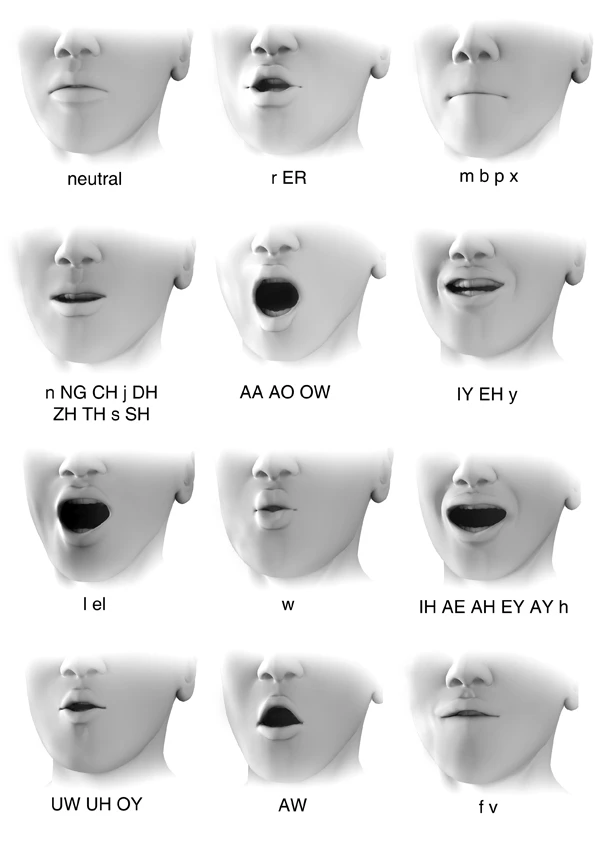
// Initialize lip sync data
let viseme = 'X'; // Default closed mouth
let mouthOpen = 0;
let mouthSmile = 0;

if (normalizedLevel > 0.01) {
  // Analyze frequency ranges for realistic viseme detection
  // With fftSize=256 and ~44.1kHz sample rate, each bin ≈ 172 Hz
  const lowFreq = dataArray.slice(0, 15).reduce((sum, val) => sum + val, 0) / 15;   // 0-2.5kHz
  const midFreq = dataArray.slice(15, 60).reduce((sum, val) => sum + val, 0) / 45;  // 2.5-10kHz
  const highFreq = dataArray.slice(60, 100).reduce((sum, val) => sum + val, 0) / 40; // 10-17kHz

  // Enhanced viseme detection based on frequency dominance
  if (normalizedLevel > 0.15) {
    if (highFreq > midFreq && highFreq > lowFreq) {
      // High frequency dominant - 'ee', 'ih', 's', 'sh' sounds
      viseme = Math.random() > 0.5 ? 'C' : 'H'; // viseme_I or viseme_TH
    } else if (lowFreq > midFreq && lowFreq > highFreq) {
      // Low frequency dominant - 'oh', 'oo', 'ow' sounds
      viseme = Math.random() > 0.5 ? 'E' : 'F'; // viseme_O or viseme_U
    } else if (midFreq > 20) {
      // Mid frequency dominant - 'ah', 'ay', 'eh' sounds
      viseme = Math.random() > 0.5 ? 'D' : 'A'; // viseme_AA or viseme_PP
    } else {
      // Consonants - 'p', 'b', 'm', 'k', 'g'
      viseme = Math.random() > 0.5 ? 'B' : 'G'; // viseme_kk or viseme_FF
    }
  } else if (normalizedLevel > 0.05) {
    // Lower volume speech
    viseme = 'A'; // viseme_PP for general speech
  }

  // Calculate mouth movements with natural variation
  mouthOpen = Math.min(normalizedLevel * 2.5, 1); // Amplify for visibility
  mouthSmile = normalizedLevel * 0.15; // Subtle smile during speech
}

// Generate comprehensive lip sync data
setLipSyncData({
  viseme: viseme,
  mouthOpen: mouthOpen,
  mouthSmile: mouthSmile,
  jawOpen: mouthOpen * 0.7, // Jaw follows mouth but less pronounced
  audioLevel: normalizedLevel,
  frequencies: { low: lowFreq, mid: midFreq, high: highFreq }
});
The complete lip sync data object now contains:
viseme: Letter code (A-X) representing the current phonememouthOpen: 0-1 value for jaw openingmouthSmile: Subtle smile during speechjawOpen: Jaw movement (70% of mouth open)audioLevel: Overall volume levelfrequencies: Raw frequency data for debugging
Integrate Avatar and Apply Morph Targets
Now we connect our audio analysis to the 3D avatar’s facial blend shapes.
1. Load the ReadyPlayer.me avatar

In src/components/Avatar.jsx, load the 3D model with morph targets:
// Initialize lip sync data
let viseme = 'X'; // Default closed mouth
let mouthOpen = 0;
let mouthSmile = 0;

if (normalizedLevel > 0.01) {
  // Analyze frequency ranges for realistic viseme detection
  // With fftSize=256 and ~44.1kHz sample rate, each bin ≈ 172 Hz
  const lowFreq = dataArray.slice(0, 15).reduce((sum, val) => sum + val, 0) / 15;   // 0-2.5kHz
  const midFreq = dataArray.slice(15, 60).reduce((sum, val) => sum + val, 0) / 45;  // 2.5-10kHz
  const highFreq = dataArray.slice(60, 100).reduce((sum, val) => sum + val, 0) / 40; // 10-17kHz

  // Enhanced viseme detection based on frequency dominance
  if (normalizedLevel > 0.15) {
    if (highFreq > midFreq && highFreq > lowFreq) {
      // High frequency dominant - 'ee', 'ih', 's', 'sh' sounds
      viseme = Math.random() > 0.5 ? 'C' : 'H'; // viseme_I or viseme_TH
    } else if (lowFreq > midFreq && lowFreq > highFreq) {
      // Low frequency dominant - 'oh', 'oo', 'ow' sounds
      viseme = Math.random() > 0.5 ? 'E' : 'F'; // viseme_O or viseme_U
    } else if (midFreq > 20) {
      // Mid frequency dominant - 'ah', 'ay', 'eh' sounds
      viseme = Math.random() > 0.5 ? 'D' : 'A'; // viseme_AA or viseme_PP
    } else {
      // Consonants - 'p', 'b', 'm', 'k', 'g'
      viseme = Math.random() > 0.5 ? 'B' : 'G'; // viseme_kk or viseme_FF
    }
  } else if (normalizedLevel > 0.05) {
    // Lower volume speech
    viseme = 'A'; // viseme_PP for general speech
  }

  // Calculate mouth movements with natural variation
  mouthOpen = Math.min(normalizedLevel * 2.5, 1); // Amplify for visibility
  mouthSmile = normalizedLevel * 0.15; // Subtle smile during speech
}

// Generate comprehensive lip sync data
setLipSyncData({
  viseme: viseme,
  mouthOpen: mouthOpen,
  mouthSmile: mouthSmile,
  jawOpen: mouthOpen * 0.7, // Jaw follows mouth but less pronounced
  audioLevel: normalizedLevel,
  frequencies: { low: lowFreq, mid: midFreq, high: highFreq }
});
2.Apply lip sync to morph targets in real-time
Use React Three Fiber’s useFrame to update morph targets every frame:
// Helper to get the mesh containing morph targets
const getMorphTargetMesh = () => {
  let morphTargetMesh = null;
  scene.traverse((child) => {
    if (!morphTargetMesh && child.isSkinnedMesh &&
        child.morphTargetDictionary &&
        Object.keys(child.morphTargetDictionary).length > 0) {
      morphTargetMesh = child;
    }
  });
  return morphTargetMesh;
};

// Smooth interpolation helper - applies to ALL SkinnedMeshes in scene
const lerpMorphTarget = (target, value, speed = 0.1) => {
  scene.traverse((child) => {
    if (child.isSkinnedMesh && child.morphTargetDictionary) {
      const index = child.morphTargetDictionary[target];
      if (index === undefined ||
          child.morphTargetInfluences[index] === undefined) {
        return;
      }
      child.morphTargetInfluences[index] = THREE.MathUtils.lerp(
        child.morphTargetInfluences[index],
        value,
        speed
      );
    }
  });
};

// Enhanced smooth interpolation for mouth targets with easing
const smoothLerpMouthTarget = (target, targetValue, deltaTime) => {
  if (!mouthTargetValues.current[target]) {
    mouthTargetValues.current[target] = 0;
  }

  const isOpening = targetValue > mouthTargetValues.current[target];
  const smoothSpeed = isOpening ? 15.0 : 18.0;

  mouthTargetValues.current[target] = THREE.MathUtils.lerp(
    mouthTargetValues.current[target],
    targetValue,
    1 - Math.exp(-smoothSpeed * deltaTime)
  );

  lerpMorphTarget(target, mouthTargetValues.current[target], 0.9);
};

// Main animation loop - runs every frame (~60 FPS)
useFrame((state, deltaTime) => {
  // Smooth the audio level to reduce jitter
  const targetAudioLevel = audioLevel || 0;
  smoothedAudioLevel.current = THREE.MathUtils.lerp(
    smoothedAudioLevel.current,
    targetAudioLevel,
    1 - Math.exp(-15 * deltaTime) // Exponential smoothing
  );

  const appliedMorphTargets = [];

  // Apply WebAudio lip sync data if available and audio is active
  if (lipSyncData?.viseme && smoothedAudioLevel.current > 0.01) {
    const currentViseme = lipSyncData.viseme;
    const visemeTarget = corresponding[currentViseme];
    const mouthShape = mouthMorphTargets[currentViseme];

    // Handle smooth viseme transitions
    if (lastViseme.current !== currentViseme) {
      visemeTransition.current = 0;
      lastViseme.current = currentViseme;
    }
    visemeTransition.current = Math.min(
      visemeTransition.current + deltaTime * 12,
      1
    );

    // Apply ARKit viseme blend shape
    if (visemeTarget) {
      appliedMorphTargets.push(visemeTarget);
      const intensity = Math.min(smoothedAudioLevel.current * 2.0, 1.0) *
                       visemeTransition.current;
      lerpMorphTarget(visemeTarget, intensity, 0.8);
    }

    // Apply enhanced mouth shapes with smoothLerpMouthTarget
    if (mouthShape) {
      Object.entries(mouthShape).forEach(([morphTarget, value]) => {
        const smoothedIntensity = value * smoothedAudioLevel.current * 4 *
                                  visemeTransition.current;
        const clampedIntensity = Math.min(smoothedIntensity, value * 1.2);
        smoothLerpMouthTarget(morphTarget, clampedIntensity, deltaTime);
        appliedMorphTargets.push(morphTarget);
      });
    }

    // Add natural jaw movement with breathing variation
    const breathingVariation = Math.sin(state.clock.elapsedTime * 2) * 0.1;
    const baseJawOpen = (mouthShape?.jawOpen || 0.3) + breathingVariation;
    const jawIntensity = baseJawOpen * smoothedAudioLevel.current * 3.0 *
                        visemeTransition.current;
    smoothLerpMouthTarget("jawOpen", Math.min(jawIntensity, 1.0), deltaTime);

    // Mouth width variation
    const mouthWidth = smoothedAudioLevel.current * 0.8 * visemeTransition.current;
    smoothLerpMouthTarget("mouthLeft", mouthWidth, deltaTime);
    smoothLerpMouthTarget("mouthRight", mouthWidth, deltaTime);

    appliedMorphTargets.push("jawOpen", "mouthLeft", "mouthRight");
  }

  // Reset unused morph targets smoothly
  Object.values(corresponding).forEach((viseme) => {
    if (!appliedMorphTargets.includes(viseme)) {
      lerpMorphTarget(viseme, 0, 0.2);
    }
  });

  // Gentle reset to slightly open mouth when silent
  if (!lipSyncData || smoothedAudioLevel.current <= 0.01) {
    smoothLerpMouthTarget("jawOpen", 0.02, deltaTime);
    smoothLerpMouthTarget("mouthOpen", 0.01, deltaTime);
  }
});
Note: The actual implementation uses smoothLerpMouthTarget for mouth movements (with exponential easing) and lerpMorphTarget for visemes. See Avatar.jsx lines 290-340 and helper functions at lines 493-540.

Implement expression controls that work alongside lip sync:
const facialExpressions = {
  default: {},
  smile: {
    browInnerUp: 0.15,
    eyeSquintLeft: 0.3,
    eyeSquintRight: 0.3,
    mouthSmileLeft: 0.8,
    mouthSmileRight: 0.8,
    cheekSquintLeft: 0.4,
    cheekSquintRight: 0.4,
  },
  surprised: {
    eyeWideLeft: 0.5,
    eyeWideRight: 0.5,
    jawOpen: 0.351,
    mouthFunnel: 1,
    browInnerUp: 1,
  },
  sad: {
    mouthFrownLeft: 1,
    mouthFrownRight: 1,
    mouthShrugLower: 0.78,
    browInnerUp: 0.45,
    eyeSquintLeft: 0.72,
    eyeSquintRight: 0.75,
  },
  angry: {
    browDownLeft: 1,
    browDownRight: 1,
    eyeSquintLeft: 1,
    eyeSquintRight: 1,
    jawForward: 1,
    mouthShrugLower: 1,
    noseSneerLeft: 1,
  }
};
The key is that expressions are applied FIRST, then lip sync is layered on top. Lip sync only affects mouth-related blend shapes, leaving eyes, brows, and cheeks controlled by expressions.
That’s it! The complete implementation is in src/components/Avatar.jsx. The key takeaways:
- WebAudio analysis happens in
useAgora.jsxduring remote audio subscription - Lip sync data flows from
useAgora()→Avatarcomponent → morph targets - Expressions and lip sync work together by applying expressions first, then lip sync
- Smooth interpolation prevents jerky movements (exponential smoothing)
- Viseme transitions add natural mouth shape changes
- Intensity multipliers (2x-4x) make movements visible on 3D models
Test AI Avatar with Lip Sync
To verify your implementation works correctly:
1. Start the application
2. Configure credentials
- Click the settings (☰) button
- Enter all API credentials in their respective tabs
- Ensure Agora App ID and token are valid (tokens expire every 24 hours)
3. Connect to the Agora RTC channel

- Click the “Connect” button in the UI
- You should see “Connected” status in the console
- The avatar should load and display
4. Test speech-to-avatar synchronization
- Speak into your microphone: “Hello, can you hear me?”
- The AI agent should respond with synthesized speech
- Observe the avatar’s mouth movements:
- Mouth should open and close in sync with audio
- Different phonemes should produce different mouth shapes
- Transitions should be smooth, not jerky
5. Verify frequency mapping
- Open browser DevTools → Console
- Look for log messages showing audio levels
- When AI speaks, you should see values > 0.01
- When silent, values should be near 0
6. Test expressions
- Use the expression buttons in the UI
- Avatar should transition to new expression
- Lip sync should continue working on top of expression
- Expression should not “fight” with lip movements
7. Check performance
- Open DevTools → Performance tab
- Record while AI is speaking
- Frame rate should maintain 60 FPS
- If dropping below 30 FPS, reduce
fftSizeto 512
Common issues:
- Avatar mouth not moving: Check WebAudio permissions, verify remote audio track is playing
- Jerky animations: Increase
smoothingTimeConstantto 0.5-0.8 - Wrong mouth shapes: Adjust frequency bin ranges in
calculateViseme() - No audio: Verify Agora token hasn’t expired, check microphone permissions
Next Steps
You’ve successfully built a real-time AI avatar with lip sync powered by Agora ConvoAI! You now understand how to:
- Integrate Agora RTC for real-time voice streaming
- Analyze audio frequencies with WebAudio API
- Map speech patterns to visemes
- Animate 3D avatars with morph targets
- Blend lip sync with facial expressions
The complete source code is available on GitHub.
Enhance your implementation
- Add emotion detection: Use Agora’s ConvoAI skip patterns to embed emotion markers in LLM responses and trigger expressions automatically
- Improve viseme accuracy: Fine-tune frequency ranges for different languages and accents
- Optimize for mobile: Reduce polygon count and texture resolution for mobile devices
- Add gesture system: Extend to body animations synchronized with speech rhythm
- Multi-language support: Adjust viseme mappings for non-English phonemes
Resources
- Agora ConvoAI Documentation
- Agora RTC Web SDK Reference
- ReadyPlayer.me Documentation
- WebAudio API Guide
- Three.js Morph Targets
- Join the Agora Developer Community
Built with ❤️ using Agora ConvoAI, ReadyPlayer.me, and WebAudio API
Questions? Open an issue on GitHub


