
Voice AI sounds simple in demos.
Tap a mic. Speak. Wait for the AI. Hear a response.
But the moment you try to build this inside a real Android app, the problem becomes much deeper.
You are no longer just handling a text prompt. You are handling:
- microphone permissions
- audio capture
- partial transcripts
- speech endpointing
- LLM latency
- text-to-speech playback
- interruptions
- audio focus
- lifecycle changes
- Bluetooth routing
- stale callbacks
- network instability
That is why a good Voice AI experience is not just about Speech-to-Text → LLM → Text-to-Speech.
It is about making the full loop feel fast, natural, interruptible, and trustworthy.
The basic Voice AI loop
At the highest level, a Voice AI app looks like this:

This diagram is correct, but it hides the hard parts.
The real engineering challenge is not just moving data through this pipeline. The challenge is making the pipeline behave like a conversation.
A conversation has timing. A conversation has interruptions. A conversation has pauses. A conversation has corrections.
Voice AI on Android needs to respect all of that.
The first Android decision: how do you capture audio?
Before choosing the AI model, the app needs to decide how it captures voice.
On Android, this usually comes down to three options:
SpeechRecognizer
Good for:
- Simple dictation
- Quick voice commands
- Platform-level speech recognition
- Fast prototypes where you do not need full control over the audio pipeline
Not ideal for:
- Continuous Voice AI sessions
- Custom streaming pipelines
- Fine-grained control over audio buffers
- Advanced interruption and barge-in handling
AudioRecord
Good for:
- Real-time PCM audio streaming
- Custom speech-to-text pipelines
- Low-level control over microphone input
- Streaming audio to your own backend or STT service
- Building serious conversational Voice AI flows
Not ideal for:
- Very quick prototypes
- Teams that do not want to manage buffers, threading, and audio lifecycle manually
MediaRecorder
Good for:
- Recording audio into files
- Saving voice notes
- Uploading complete audio recordings
- Use cases where real-time interaction is not required
Not ideal for:
- Conversational streaming
- Low-latency Voice AI
- Partial transcripts
- Real-time interruption handling

Key idea: A demo can treat voice as a recording. A real Voice AI app should treat voice as a stream.
Visual #1
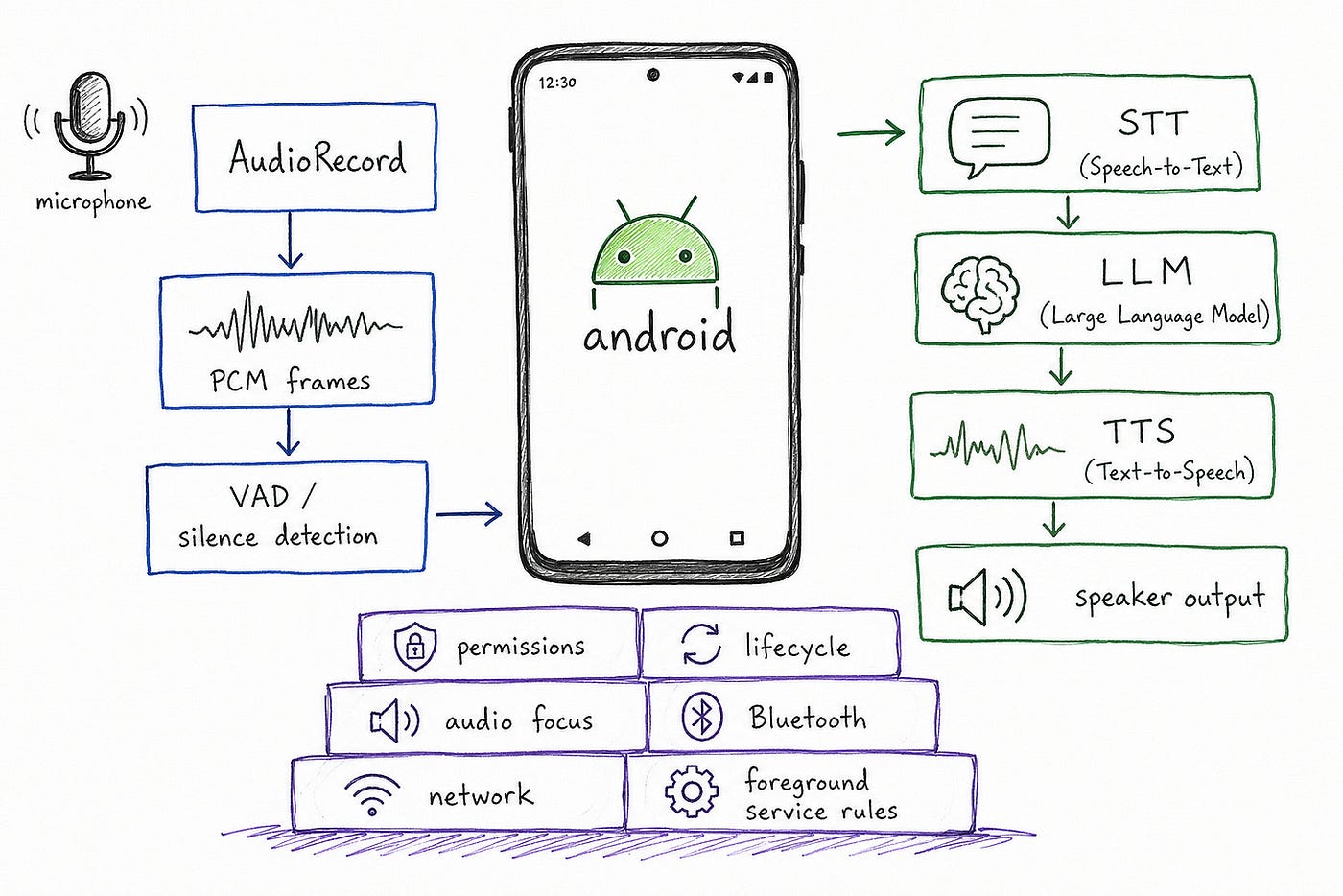
The model is only one part of the system. Android decides how voice enters, moves, pauses, resumes, and exits.
A real Voice AI app thinks in frames, not files
A simple implementation records a file, uploads it, waits for transcription, sends text to an LLM, then plays a response.
That works, but it feels slow.
A better architecture streams small chunks of audio continuously.

This changes the app architecture.
Now you are not handling a single request-response flow. You are coordinating multiple live systems:
- audio is produced continuously
- network quality changes
- transcripts arrive partially
- the user may stop speaking
- the user may interrupt
- the AI may still be generating
- TTS may already be playing
This is why Voice AI feels less like a normal API integration and more like a real-time system.
Endpointing: the invisible UX layer
Speech-to-text answers one question:
What did the user say?
Endpointing answers a different question:
Is the user done speaking?
That second question is harder than it sounds.
If endpointing is too aggressive, the app cuts users off.
If endpointing is too slow, the app feels laggy.
For example:
“Can you send a message to Rahul…”
The user might be done.
Or they might continue:
“…saying I’ll be ten minutes late.”
A good Voice AI app cannot treat silence as a simple boolean. Silence is a signal, but it is not always an answer.

The best voice experiences usually combine:
- voice activity detection
- silence duration
- transcript stability
- punctuation hints
- product context
- user intent
Key idea: In voice UX, endpointing is where latency and politeness collide.
Voice AI is a state machine
Many Voice AI bugs are not AI bugs.
They are state bugs.
The app thinks it is listening, but the microphone is stopped. The UI shows “thinking,” but TTS is already playing. A stale transcript arrives after the user has started a new request. The assistant keeps speaking after the user interrupted.
A cleaner way to design the system is as an explicit state machine.

This mental model helps because Voice AI is full of asynchronous work.
STT, LLM, TTS, network calls, UI rendering, and playback can all complete at different times.
One practical pattern is to give every voice turn an identity.
fun onPartialTranscript(turnId: String, text: String) {
    if (turnId != activeTurnId) return
    updateVoiceState {
        it.copy(partialTranscript = text)
    }
}
That small check prevents an entire class of bugs where old callbacks mutate the current conversation.
Key idea: In Voice AI, correctness is not only about the answer. It is also about whether the answer belongs to the current turn.
Barge-in: the difference between a demo and a product
A voice assistant that cannot be interrupted feels unnatural.
Humans interrupt each other all the time:
- “No, I meant tomorrow.”
- “Stop.”
- “Actually, make it shorter.”
- “Wait, change the location.”
Voice AI needs the same behavior.
But on Android, barge-in is tricky because the app may be speaking and listening at the same time.
The microphone can hear the assistant’s own TTS output. If the app is careless, it may transcribe itself and send that text back into the model.

A serious implementation needs a strategy:
- pause or lower TTS when user speech is detected
- cancel queued audio chunks
- tag each session with a turn ID
- ignore stale transcripts
- handle echo as part of the pipeline
- fall back to half-duplex mode when needed
Key idea: Barge-in is not just a feature. It is the test of whether the system understands turn-taking.
Visual #2

Without interruption handling, a voice assistant can become part of its own input.
Audio focus and real-world situations
A Voice AI app needs to behave correctly across real-world interruptions. These are not edge cases — they happen all the time.
Incoming call
Bad behavior:
- Assistant keeps speaking over the call
- Conversation state gets lost or confused
Better behavior:
- Immediately stop playback
- Release audio focus
- Preserve conversation state so the user can resume later
Music is already playing
Bad behavior:
- Assistant blasts audio over existing music
- Competes for attention and sounds chaotic
Better behavior:
- Request audio focus properly
- Duck or pause existing audio
- Speak clearly without overwhelming the user
User interrupts while assistant is speaking
Bad behavior:
- TTS continues talking
- User feels ignored or loses control
Better behavior:
- Immediately cancel TTS playback
- Switch back to listening state
- Treat interruption as a new turn in the conversation
Bluetooth or audio route changes
Bad behavior:
- Audio stops unexpectedly
- Playback goes silent or to wrong device
Better behavior:
- Detect route changes (e.g., headphones, car, earbuds)
- Seamlessly switch output
- Recover playback without breaking the experience
Audio focus lost (another app takes over)
Bad behavior:
- App ignores the change and keeps playing
- Creates overlapping audio or glitches
Better behavior:
- Respect audio focus changes
- Pause, duck, or stop playback based on the event
- Resume gracefully when focus is regained
Key idea:
Voice AI is not running in isolation. It must behave like a well-mannered participant in the device’s audio ecosystem.
Android permissions shape the product
Voice AI is also constrained by platform rules.
Microphone access requires RECORD_AUDIO. Android classifies recording audio as a dangerous permission that requires runtime approval from the user.
For long-running microphone capture, foreground service rules also matter. Android requires microphone foreground services to declare the microphone foreground service type and FOREGROUND_SERVICE_MICROPHONE; the service still needs RECORD_AUDIO. Android’s docs also note that microphone foreground services are affected by while-in-use permission restrictions.
This is not just platform bureaucracy. It should shape the product.
Most Voice AI apps should prefer:
- explicit mic activation
- visible recording state
- push-to-talk or session-based listening
- clear permission education
- graceful fallback to text input
- no invisible background microphone behavior
Key idea: Android is intentionally cautious with microphone access. A good Voice AI product should treat that as a design principle, not an obstacle.
The UI should show the conversation state
Pure voice sounds elegant in demos, but on Android, hybrid voice + visual UX usually works better.
The screen helps users understand:
- whether the app is listening
- what it heard
- whether the transcript is final
- whether the AI is thinking
- whether the assistant is speaking
- what action will happen next
Partial transcripts need special care.
Streaming STT may first show:
“Book a cab to Indira…”
Then revise it to:
“Book a cab to India Gate…”
So the UI should distinguish between:
- unstable partial transcript
- stable transcript
- final submitted utterance
- AI response

Key idea: The transcript UI should feel alive, but not nervous.
The Activity should not own the voice system
A common Android mistake is putting too much voice logic inside an Activity or composable screen.
That works for a prototype. It breaks in real life.
Users rotate the device. They background the app. They receive calls. They switch audio devices. They revoke permissions. They start a new request before the old one finishes.
The UI should render state, not own the full pipeline.
A stronger architecture looks like this:
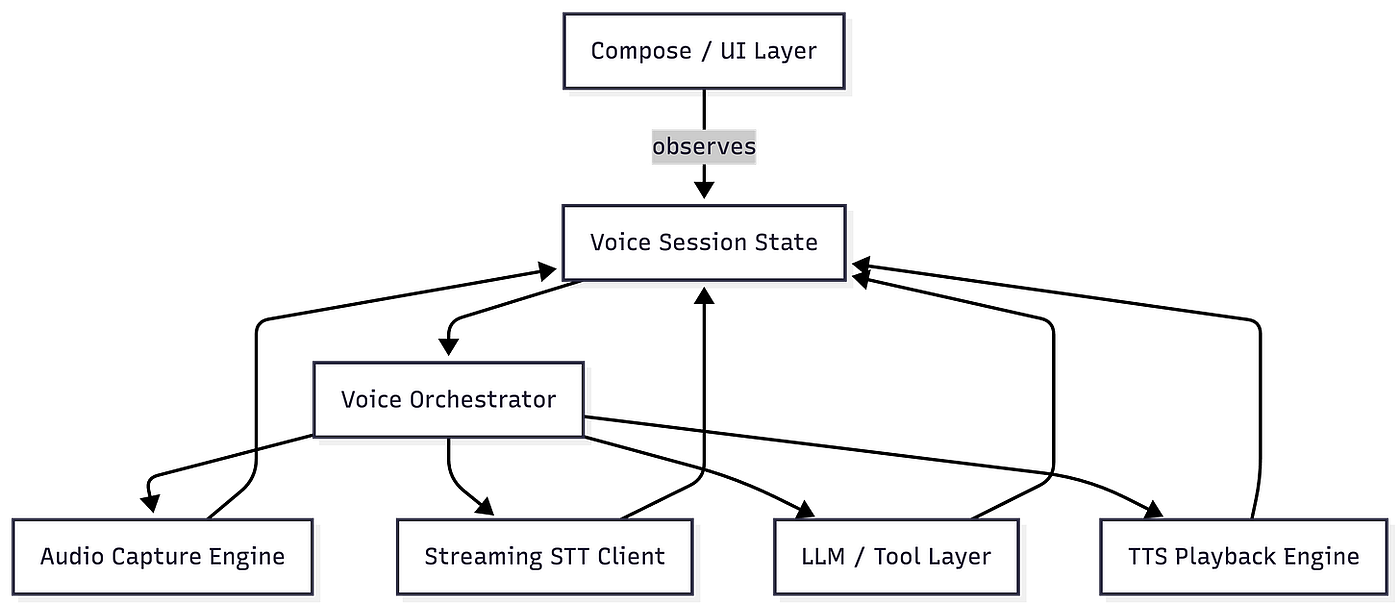
The voice session should live in a layer that can survive UI changes and coordinate the pipeline cleanly.
Key idea: The screen is not the voice system. The screen is a view into the voice system.
What to measure
You cannot improve Voice AI by only measuring model latency.
You need to measure the full conversational loop.
Important metrics
Time to microphone ready
- First signal of responsiveness
- How quickly the app starts listening after user intent
Time to first partial transcript
- Builds user confidence that the system is working
- Reduces uncertainty during speaking
Endpointing delay
- Time taken to detect that the user has finished speaking
- Too high → dead-air feeling
- Too low → cuts users off
Time to final transcript
- Measures STT responsiveness
- Impacts how fast the system can move to reasoning
Time to first AI token
- Indicates how quickly the AI starts responding
- Critical for perceived intelligence
Time to first audio playback
- When the user actually hears something back
- One of the most important “feel” metrics
Barge-in success rate
- How reliably users can interrupt the assistant
- Key for natural conversation flow
Audio route failures
- Issues with speaker, Bluetooth, headphones
- Directly impacts real-world Android reliability
Permission denial rate
- How often users reject microphone access
- Signals onboarding and trust issues
Session cancellation rate
- How often users abandon interactions midway
- Indicates confusion, latency, or UX friction
Key idea:
Voice AI quality is not one number.
It is the sum of many small delays, recoveries, and transitions.
Visual #3
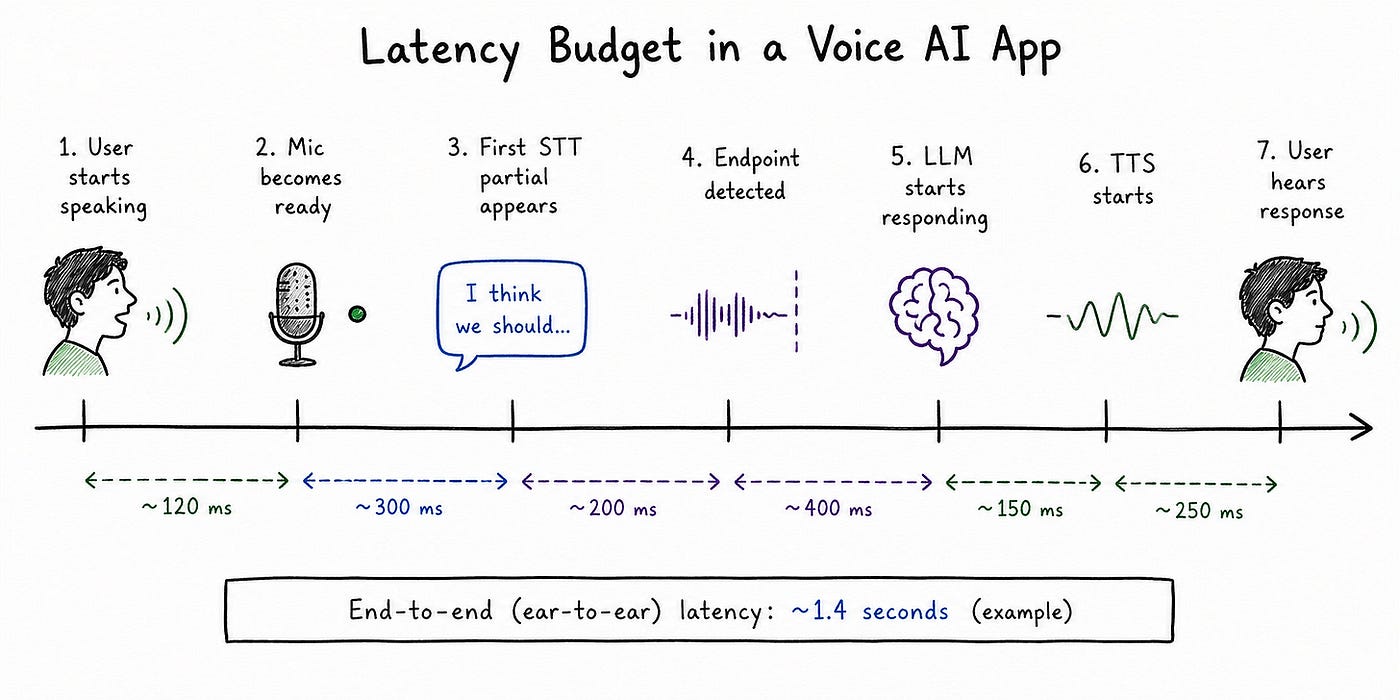
Small delays compound into awkward conversation.
Final thought
Voice AI on Android is exciting because it feels simple to users.
But under the hood, it is one of the most interesting mobile engineering problems right now.
It touches:
- real-time audio
- Android permissions
- lifecycle management
- streaming networks
- LLM orchestration
- TTS playback
- interruption handling
- UI state design
- product trust
The AI model may generate the response, but the Android app decides whether the interaction feels instant, polite, interruptible, and reliable.
That is the difference between a voice demo and a voice product.
The hard part is not making the app hear.
The hard part is making the app listen well.


