

The Problem: E-commerce Is Still a Lonely Experience
Online shopping lacks the human element that makes in-store experiences memorable. When you walk into a physical store, a knowledgeable salesperson can answer your questions instantly, share what other customers think, and help you understand whether a product actually fits your needs. Online? You’re on your own — scrolling through specifications you may not understand, hunting for that one review that addresses your specific concern, and ultimately guessing whether you’re making the right choice.
This gap costs retailers real money. Studies show that customers abandon purchases when they can’t get immediate answers. They leave to “do more research” and never come back. The ones who do buy often return products because they misunderstood a feature or chose the wrong variant.
Chatbots were supposed to fix this. They didn’t. Most e-commerce chatbots feel robotic, can only handle scripted scenarios, and frustrate customers more than they help. The moment someone asks something slightly outside the chatbot’s narrow training — “Does this work well for someone with small hands?” or “What do people say about using this outdoors?” — the experience falls apart.
Voice AI changes the equation entirely. Instead of typing queries and parsing walls of text, customers can simply ask questions and hear answers — the same way they’d talk to a real person. The AI can synthesize product details, customer reviews, and specifications into natural responses. It can pick up on context and follow-up questions. It feels like having a knowledgeable friend who happens to know everything about the product you’re considering.
But building real-time voice AI is genuinely hard. You need low latency (ideally sub-second, as noticeable delays above ~1 second degrade conversational flow). You need to handle interruptions naturally (customers don’t wait for the AI to finish before asking follow-ups). You need speech recognition that works with different accents, background noise, and casual speech patterns. You need text-to-speech that doesn’t sound like a robot reading a script. And you need to orchestrate all of this with an LLM that can reason about your specific product data.
This guide shows you how to build a production-ready voice shopping assistant using Agora’s Conversational AI platform — which handles the hard infrastructure problems so you can focus on the customer experience.
What We’re Building
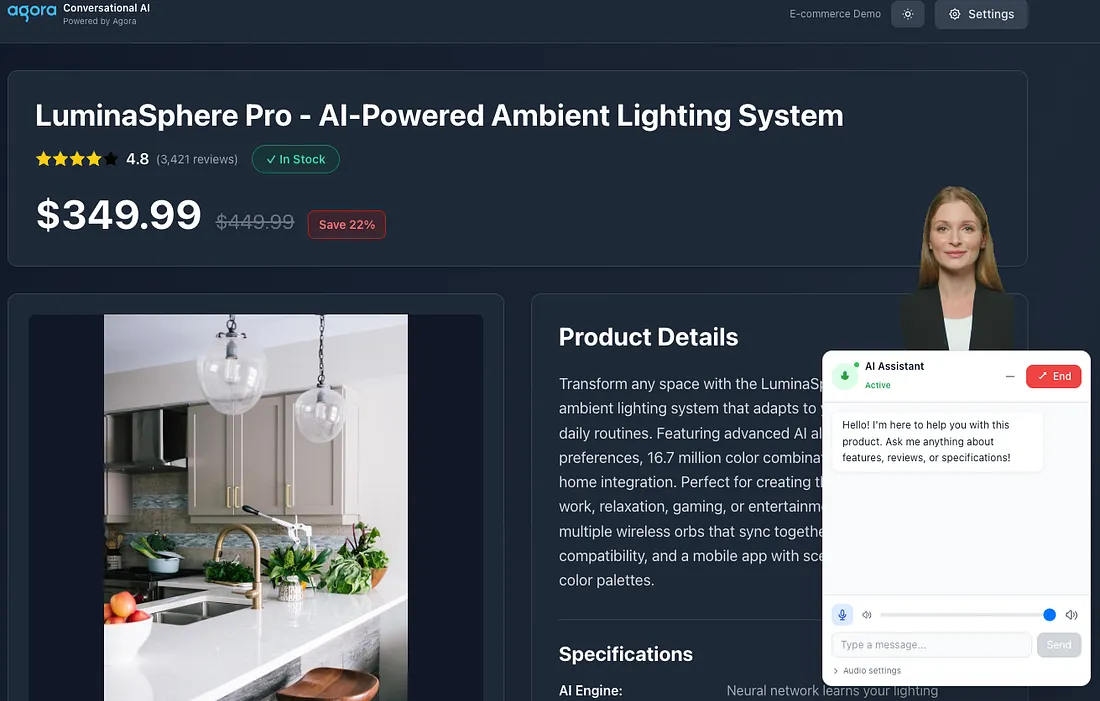
A voice-enabled shopping assistant that:
- Speaks naturally with customers — Real conversational AI, not scripted responses
- Knows your products deeply — Answers questions using actual product data, specifications, and customer reviews
- Shows the conversation — Real-time transcriptions so customers can follow along and reference what was said
- Looks human (optional) — Renders a lifelike AI avatar for visual engagement
The result is an AI that can answer questions like “What do customers say about the battery life?” by synthesizing actual reviews, or explain technical specifications in plain language, or help customers compare options — all through natural voice conversation.
Architecture Overview
The system connects four key pieces:
┌─────────────────┐     ┌──────────────────┐     ┌─────────────────────┐
│   Browser       │────▶│   Next.js API    │────▶│  Agora Services     │
│   (React)       │◀────│   Routes         │◀────│  - RTC (Audio)      │
│                 │     │                  │     │  - RTM (Messaging)  │
│  - useAgora     │     │  - /initialize   │     │  - ConvoAI Agent    │
│  - ChatInterface│     │  - /start-agent  │     │                     │
│  - ConvoAI API  │     │  - /leave-agent  │     │  External:          │
│                 │     │                  │     │  - LLM (OpenAI)     │
└─────────────────┘     └──────────────────┘     │  - TTS (Azure)      │
                                                 │  - Avatar (HeyGen)  │
                                                 └─────────────────────┘
Why this architecture?
- API Routes handle credentials — Your Agora API keys never touch the browser. The Next.js server generates tokens and starts agents securely.
- RTC carries real-time media — Agora RTC handles the bidirectional audio stream between the user and the AI agent. Low latency matters here — nobody wants to wait 2 seconds after asking a question.
- RTM carries transcripts — The Real-Time Messaging layer delivers conversation transcripts instantly. This enables the chat UI to show what both parties said.
- ConvoAI orchestrates everything — Agora’s Conversational AI service connects your LLM (like GPT-4), text-to-speech, and optional avatar into a coherent agent.
Project Structure
├── app/
│   ├── api/agora/
│   │   ├── initialize/route.ts    # Creates channel + tokens
│   │   ├── start-agent/route.ts   # Starts ConvoAI agent with product context
│   │   └── leave-agent/route.ts   # Cleanup when user exits
│   └── page.tsx                   # Entry point
├── components/
│   ├── ChatInterface.tsx          # Main voice chat UI
│   ├── AIAssistant.tsx           # Floating chat button
│   └── ProductPage.tsx           # E-commerce product display
├── hooks/
│   └── useAgora.ts               # RTC connection management
├── lib/
│   ├── conversational-ai-api/    # ConvoAI toolkit for transcripts
│   │   ├── index.ts              # Main API class
│   │   └── type.ts               # TypeScript definitions
│   └── product.ts                # Product data (mock database)
Step 1: Initialize the Agora Session
When a user clicks the AI Assistant button, we first need a channel and tokens. The /api/agora/initialize endpoint handles this:
// app/api/agora/initialize/route.tsimport { NextRequest, NextResponse } from "next/server";
import pkg from "agora-token";
const { RtcTokenBuilder, RtcRole } = pkg;
export async function POST(request: NextRequest) {
  const body = await request.json();
  const { userId, credentials } = body;
  // Generate a unique channel name
  const uid = userId ? parseInt(userId) : Math.floor(Math.random() * 100000);
  const channel = `channel_${Date.now()}_${Math.random().toString(36).substring(7)}`;
  const APP_ID = credentials?.agora?.appId || process.env.AGORA_APP_ID;
  const APP_CERTIFICATE =
    credentials?.agora?.appCertificate || process.env.AGORA_APP_CERTIFICATE;
  // Token expires in 1 hour
  const expirationTimeInSeconds = 3600;
  const currentTimestamp = Math.floor(Date.now() / 1000);
  const privilegeExpiredTs = currentTimestamp + expirationTimeInSeconds;
  // Generate a combined RTC + RTM token using buildTokenWithRtm2
  // This token grants RTC privileges and RTM 2.x messaging privileges for the same channel and user aging
  const token = RtcTokenBuilder.buildTokenWithRtm2(
    APP_ID,
    APP_CERTIFICATE,
    channel,
    uid, // RTC UID (numeric)
    RtcRole.PUBLISHER,
    privilegeExpiredTs, // Token expiration
    privilegeExpiredTs, // Channel join privilege
    privilegeExpiredTs, // Audio publish privilege
    privilegeExpiredTs, // Video publish privilege
    privilegeExpiredTs, // Data stream privilege
    uid.toString(), // RTM user ID (string)
    privilegeExpiredTs, // RTM privilege expiration
  );
  return NextResponse.json({
    token,
    appId: APP_ID,
    channel,
    uid,
    rtmUserId: uid.toString(),
  });
}
Key insight: We use buildTokenWithRtm2 to create a single token that grants both RTC (audio) and RTM (messaging) privileges. This simplifies client-side code—one token does both jobs.
Step 2: Start the ConvoAI Agent
The magic happens in /api/agora/start-agent. This endpoint:
- Loads product context (name, price, specs, reviews)
- Constructs a system prompt that shapes the AI’s personality
- Calls Agora’s ConvoAI API to spawn an agent
// app/api/agora/start-agent/route.ts (simplified)
export async function POST(request: NextRequest) {
  const { channel, userId, token, productId } = await request.json();
  // Fetch product data for AI context
  const product = await fetchProduct(productId || "1");
  // Build the system prompt with product knowledge
  const context = `You are Katya, a friendly shopping assistant!

Product: ${product.name}
Price: $${product.price} (Save ${product.discount}%)
Rating: ${product.rating}/5 stars
Specifications:
${Object.entries(product.specifications)
  .map(([key, value]) => `- ${key}: ${value}`)
  .join("\n")}
Recent Reviews:
${product.reviews
  .slice(0, 5)
  .map((r) => `• ${r.userName}: "${r.title}" - ${r.comment}`)
  .join("\n")}
RULES:
1. Answer questions about this product only
2. Reference specific reviews when relevant
3. Be enthusiastic but not pushy
4. Do not use emojis, as they may cause unintended pronunciation in TTS output.`;
  // Generate a separate token for the agent (UID 1000)
  const agentToken = RtcTokenBuilder.buildTokenWithRtm2(
    APP_ID,
    APP_CERTIFICATE,
    channel,
    1000, // Agent always uses UID 1000
    RtcRole.PUBLISHER,
    privilegeExpiredTs,
    // ... other privileges
    "1000", // Agent's RTM user ID
    privilegeExpiredTs,
  );
  // Configure the ConvoAI agent
  const payload = {
    name: `ecommerce_agent_${Date.now()}`,
    properties: {
      channel: channel,
      token: agentToken,
      agent_rtc_uid: "1000",
      agent_rtm_uid: "1000",
      remote_rtc_uids: [`${userId}`],
      idle_timeout: 120,
      // Enable RTM for transcripts
      advanced_features: { enable_rtm: true },
      parameters: { data_channel: "rtm" },
      // LLM configuration
      llm: {
        url: process.env.LLM_URL || "https://api.openai.com/v1/chat/completions",
        api_key: LLM_API_KEY,
        system_messages: [{ role: "system", content: context }],
        greeting_message: "Hi! I'm here to help with this product.",
        params: { model: "gpt-4o-mini" },
      },
      // Speech recognition
      asr: {
        vendor: "ares",
        language: "en-US",
      },
      // Text-to-speech (Azure)
      tts: {
        vendor: "microsoft",
        params: {
          key: TTS_API_KEY,
          region: "eastus",
          voice_name: "en-US-AriaNeural",
          rate: "1.3", // Slightly faster speech
        },
      },
    },
  };
  // Call Agora's ConvoAI API
  const response = await axios.post(
    `https://api.agora.io/api/conversational-ai-agent/v2/projects/${APP_ID}/join`,
    payload,
    {
      headers: {
        Authorization: `Basic ${Buffer.from(`${API_KEY}:${API_SECRET}`).toString("base64")}`,
        "Content-Type": "application/json",
      },
    },
  );
  return NextResponse.json(response.data);
}
Why these specific settings?
agent_rtc_uid: "1000"- The agent needs its own UID separate from the user. Using a fixed UID makes it easy to identify agent messages.enable_rtm: true+data_channel: "rtm"- Required for receiving transcripts. Without this, you only get audio.rate: "1.3"- Slightly faster TTS sounds more natural in conversation.
Step 3: Connect the Browser to Agora
The useAgora hook manages the audio connection:
// hooks/useAgora.ts
export function useAgora({ appId, channel, token, uid }: UseAgoraProps) {
  const [isConnected, setIsConnected] = useState(false);
  const [isMuted, setIsMuted] = useState(false);
  const [localAudioTrack, setLocalAudioTrack] = useState<any>(null);
  const [remoteAudioTrack, setRemoteAudioTrack] = useState<any>(null);
  const clientRef = useRef<any>(null);
  useEffect(() => {
    if (!appId || !channel || !token) return;
    const init = async () => {
      const AgoraRTC = (await import("agora-rtc-sdk-ng")).default;
      // CRITICAL: Enable audio PTS metadata before creating the RTC client.
      // Required for proper speech recognition timestamp alignment in ConvoAI.
      (AgoraRTC as any).setParameter("ENABLE_AUDIO_PTS_METADATA", true);
      const client = AgoraRTC.createClient({ mode: "rtc", codec: "vp8" });
      clientRef.current = client;
      // Join the channel
      await client.join(appId, channel, token, uid);
      setIsConnected(true);
      // Create and publish microphone track
      const audioTrack = await AgoraRTC.createMicrophoneAudioTrack();
      await client.publish([audioTrack]);
      setLocalAudioTrack(audioTrack);
      // Listen for the agent's audio
      client.on("user-published", async (user, mediaType) => {
        await client.subscribe(user, mediaType);
        if (mediaType === "audio") {
          const remoteTrack = user.audioTrack;
          setRemoteAudioTrack(remoteTrack);
          // Small delay ensures track is ready
          setTimeout(() => remoteTrack?.play(), 100);
        }
      });
    };
    init();
    return () => {
      // Cleanup on unmount
      localAudioTrack?.close();
      clientRef.current?.leave();
    };
  }, [appId, channel, token, uid]);
  const toggleMute = async () => {
    if (localAudioTrack) {
      await localAudioTrack.setMuted(!isMuted);
      setIsMuted(!isMuted);
    }
  };
  return {
    isConnected,
    isMuted,
    toggleMute,
    localAudioTrack,
    remoteAudioTrack,
  };
}
Step 4: Display Real-Time Transcripts
The ConversationalAIAPI class from lib/conversational-ai-api handles transcript delivery. Here’s how ChatInterface.tsx sets it up:
// components/ChatInterface.tsx (transcript handling)
useEffect(() => {
  if (!agoraConfig || !agora?.client) return;
  const initToolkit = async () => {
    // Initialize RTM client
    const AgoraRTM = await import("agora-rtm-sdk");
    const RTM = AgoraRTM.default?.RTM || AgoraRTM.RTM;
    const rtmClient = new RTM(agoraConfig.appId, agoraConfig.rtmUserId);
    await rtmClient.login({ token: agoraConfig.token }); // Token must include RTM privileges
    // Initialize the ConversationalAIAPI toolkit
    const convoAPI = ConversationalAIAPI.init({
      rtcEngine: agora.client,
      rtmEngine: rtmClient,
      renderMode: ETranscriptHelperMode.TEXT,
      enableLog: true,
    });
    // Subscribe to the channel for messages
    await convoAPI.subscribeMessage(agoraConfig.channel);
    // Listen for transcript updates
    convoAPI.on(
      EConversationalAIAPIEvents.TRANSCRIPT_UPDATED,
      (transcripts) => {
        const newMessages = transcripts
          .filter((item) => item.text?.trim())
          .map((item) => {
            // Determine if this is user or agent speech
            const isAgent =
              item.uid === "1000" ||
              item.metadata?.object === "assistant.transcription";
            return {
              role: isAgent ? "assistant" : "user",
              content: item.text,
              turnId: item.turn_id,
              timestamp: item._time,
            };
          });
        setMessages((prev) => {
          // Merge new messages, replacing intermediates with finals
          // (Implementation handles deduplication by turn_id)
          return mergeMessages(prev, newMessages);
        });
      },
    );
  };
  initToolkit();
}, [agoraConfig, agora?.client]);
How transcripts flow:
- User speaks → Agora ASR converts to text
- ConvoAI sends text to LLM
- LLM generates response
- ConvoAI sends the response as speech and also publishes assistant.transcription events via RTM.
The TRANSCRIPT_UPDATED event fires for both intermediate (in-progress) and final transcriptions. The turn_id field lets you track and replace messages as they complete.
Step 5: Send Text Messages
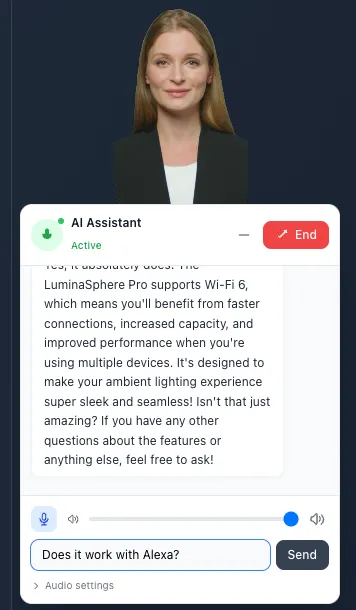
Users can also type messages instead of speaking.
// components/ChatInterface.tsx
const sendMessage = async () => {
  if (!input.trim() || !convoApiRef.current) return;
  const message: IChatMessageText = {
    messageType: EChatMessageType.TEXT,
    text: input,
    priority: EChatMessagePriority.INTERRUPTED, // Interrupt current speech
    responseInterruptable: true,
  };
  // Send to agent (UID "1000")
  await convoApiRef.current.sendText("1000", message);
  setInput("");
};
The EChatMessagePriority.INTERRUPTED setting tells the agent to stop speaking if it’s mid-response and handle the new message immediately.
Step 6: Clean Up on Exit
When the user closes the chat, clean up all connections:
// components/ChatInterface.tsx
const handleEndCall = async () => {
  // Tell Agora to stop the agent
  if (agentId) {
    await fetch("/api/agora/leave-agent", {
      method: "POST",
      headers: { "Content-Type": "application/json" },
      body: JSON.stringify({ agentId }),
    });
  }
  // Leave RTC channel
  agora?.leave();
  // Unsubscribe RTM and destroy toolkit
  if (convoApiRef.current) {
    await convoApiRef.current.unsubscribe();
    convoApiRef.current.destroy();
  }
  // Logout RTM
  rtmClientRef.current?.logout();
};
The leave-agent API route calls Agora’s endpoint:
// app/api/agora/leave-agent/route.ts
const response = await axios.post(
  `https://api.agora.io/api/conversational-ai-agent/v2/projects/${APP_ID}/agents/${agentId}/leave`,
  {},
  { headers: { Authorization: `Basic ${auth}` } },
);
Environment Variables
Create a .env.local file:
# Agora (Required)
AGORA_APP_ID=your_app_id
AGORA_APP_CERTIFICATE=your_certificate
AGORA_API_KEY=your_customer_key
AGORA_API_SECRET=your_customer_secret
# LLM - OpenAI (Required)
LLM_URL=https://api.openai.com/v1/chat/completions
LLM_API_KEY=sk-...
LLM_MODEL=gpt-4o-mini
# TTS - Azure (Required)
TTS_API_KEY=your_azure_speech_key
TTS_REGION=eastus
# Avatar - HeyGen (Optional)
HEYGEN_API_TOKEN=your_heygen_token
HEYGEN_AVATAR_ID=your_avatar_id
Optional: Adding an AI Avatar
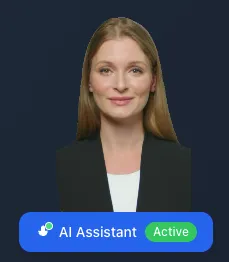
The system supports HeyGen avatars. Enable it by setting the avatar credentials:
// In start-agent payload
avatar: {
  vendor: "heygen",
  enable: true,
  params: {
    api_key: HEYGEN_API_TOKEN,
    avatar_id: HEYGEN_AVATAR_ID,
    agora_uid: "2000",      // Avatar gets its own UID
    agora_token: avatarToken,
    quality: "low"          // "low", "medium", "high"
  }
}
Debugging Tips
Agent not responding?
- Check that
ENABLE_AUDIO_PTS_METADATAis set before creating the RTC client - Verify the LLM API key and model are correct
- Look for errors in the browser console and Next.js server logs
No transcripts appearing?
- Confirm
enable_rtm: trueanddata_channel: "rtm"in the agent config - Check RTM login succeeded (no token errors)
- Verify
subscribeMessage()was called with the correct channel
Audio not playing?
- Browser autoplay policies may block audio. User interaction (like clicking the chat button) should satisfy this.
- Check that the remote audio track’s
play()method was called
What’s Next
This demo shows the core integration. From here you could:
- Connect real product data — Replace
lib/product.tswith database queries - Add product recommendations — Let the AI suggest related items
- Multi-language support — Switch ASR/TTS languages based on user preference
- Analytics — Track which questions customers ask most
The Agora Conversational AI platform handles the hard parts — real-time audio, speech recognition, and LLM orchestration. Your job is to shape the experience around your product and customers.
Quick Reference: Key Files
api/agora/initialize/route.ts:Creates channel + tokens
api/agora/start-agent/route.ts:Spawns ConvoAI agent with product context
hooks/useAgora.ts:RTC connection (audio in/out)
lib/conversational-ai-api/index.ts:Transcript handling via RTM
components/ChatInterface.tsx:Main UI with voice + text chat
Quick Reference: API Endpoints
POST conversational-ai-agent/v2/projects/{appId}/join:Start agent
POST conversational-ai-agent/v2/projects/{appId}/agents/{agentId}/leave:
Stop agent
Live Demo
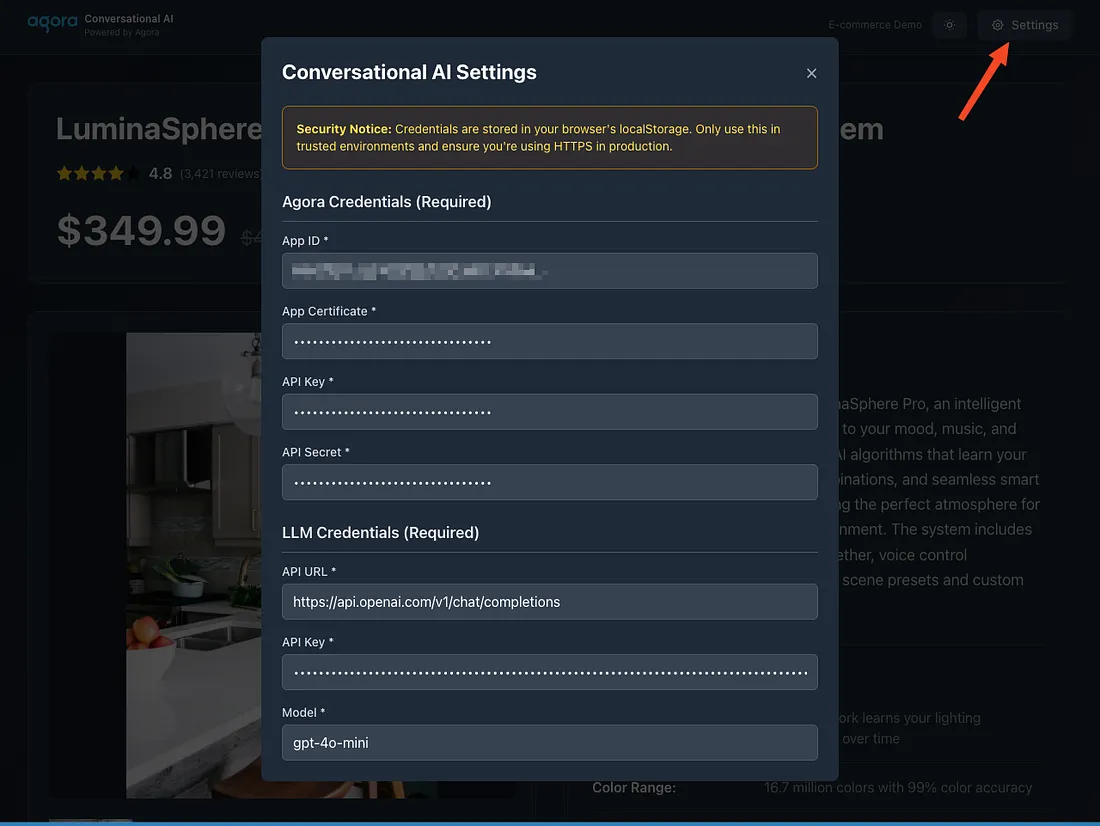
To test the live demo, click Settings in the top-right corner and enter temporary test credentials in the Conversational AI Settings panel (never use production credentials in client-side demo environments). After saving, reload the page and start an interaction to confirm the avatar joins the RTC channel and responds in real time. This setup is intended for testing and demo purposes only — use a trusted environment and HTTPS when running it.
Resources
- Full code on Github
- Agora Conversational AI Docs
- Agora RTC SDK Reference
- Agora Signaling SDK Reference
- Agora Community Discord
Built with Agora Conversational AI


