
A Step-by-Step Deep Dive with Agora and Jetpack Compose
Real-time communication (RTC) has become a core requirement for modern apps. From fitness apps with live coaching to gaming platforms with team chat and telemedicine consultations, users expect high-quality, ultra-low-latency voice and video that works seamlessly anywhere in the world.
But building RTC is one of the hardest problems in mobile engineering. It requires handling device hardware, complex networking, and real-time data processing while ensuring the system remains scalable and maintainable.
In this tutorial, we’ll walk through the architecture and implementation of a production-ready voice and video calling app from scratch.
Prerequisites
Before we dive into the code, ensure you have the following:
- Agora Developer Account: Sign up for free at console.agora.io.
- Agora App ID: Create a project in the Agora Console and copy your App ID.
- Android Studio: Latest stable version.
- Kotlin & Compose Knowledge: Familiarity with StateFlow and basic Compose layouts.
- Physical Android Device: RTC features (especially camera) are best tested on real hardware.
1. The Engineering Trade-off: Build vs. Buy
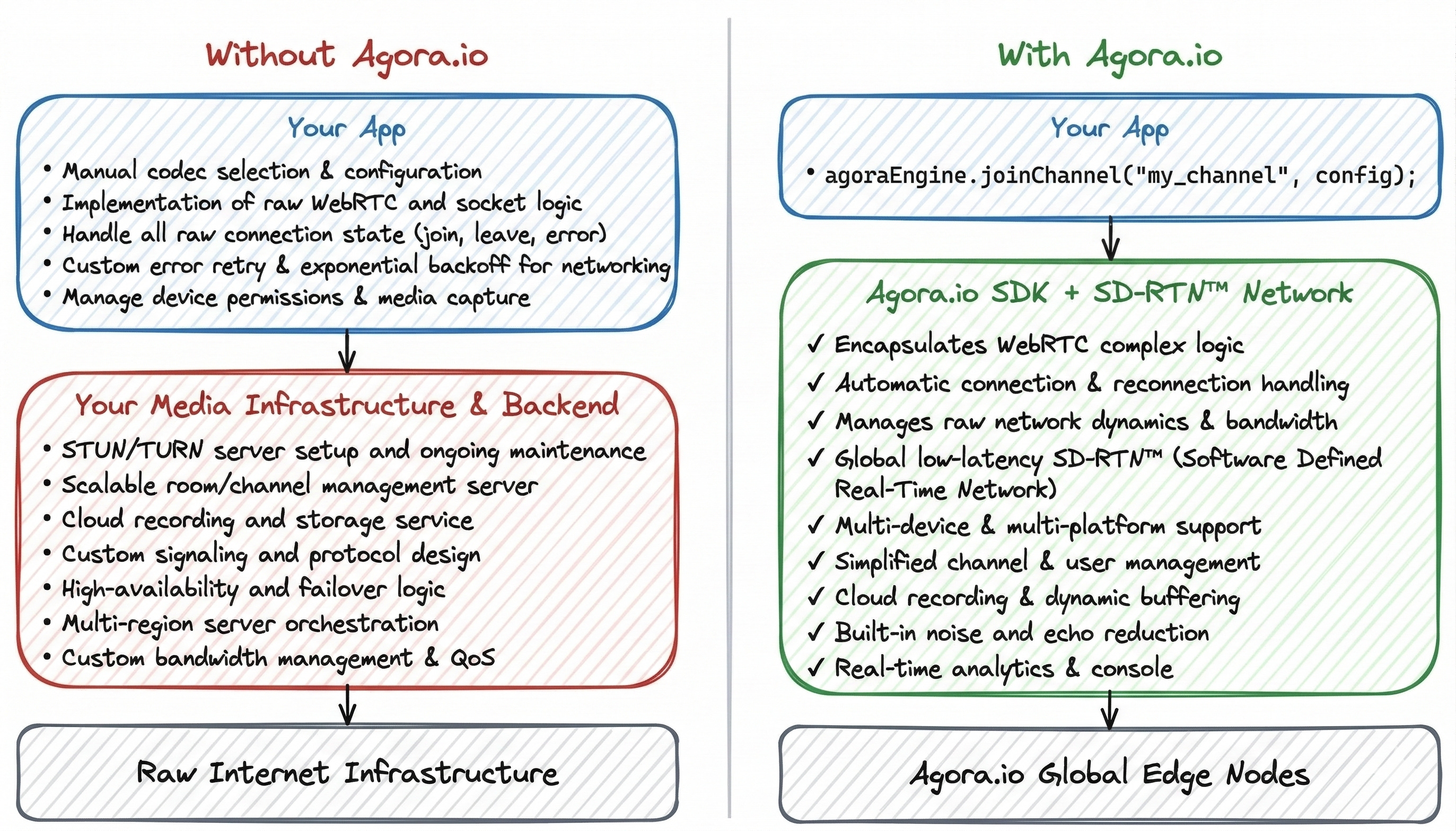
When tasked with adding RTC, engineers face a classic dilemma: Do we build on top of raw WebRTC or leverage a platform like Agora?
The DIY Route (WebRTC/SFU)
Building your own infrastructure requires managing:
- Signaling Servers: To exchange session descriptions (SDP) and ICE candidates. This involves maintaining high-availability WebSocket connections and managing user presence at scale.
- STUN/TURN Servers: For NAT traversal. Without a TURN server, approximately 20-30% of calls will fail due to firewalls or Symmetric NATs.
- Media Servers (SFU/MCU): For multi-party calls, you must deploy Selective Forwarding Units (SFUs) to manage complex bandwidth estimation.
- Global Latency: Solving the “last mile” problem across different continents where standard Internet routing (BGP) is optimized for throughput, not latency.
The Agora Advantage: SD-RTN™
Agora abstracts these complexities through its Software Defined Real-time Network (SD-RTN™). Unlike a standard CDN, SD-RTN is a global virtual overlay network with over 250 data centers worldwide that dynamically routes packets through the fastest path, ensuring 80% packet loss resilience and sub-400ms global latency.
2. Step 1: Project Configuration
First, we need to add the Agora SDK to our project. We’ll use the Version Catalog (libs.versions.toml) for clean dependency management.
Update libs.versions.toml
[versions]
agoraRtc = "4.6.3"

[libraries]
agora-rtc = { group = "io.agora.rtc", name = "full-sdk", version.ref = "agoraRtc" }
Update app/build.gradle.kts
dependencies {
 implementation(libs.agora.rtc)
 implementation("androidx.compose.material:material-icons-extended")
}
Update AndroidManifest.xml
Add the required permissions for RTC. For Android 12+, ensure you also handle BLUETOOTH_CONNECT.
<uses-permission android:name="android.permission.INTERNET" />
<uses-permission android:name="android.permission.RECORD_AUDIO" />
<uses-permission android:name="android.permission.CAMERA" />
<uses-permission android:name="android.permission.MODIFY_AUDIO_SETTINGS" />
<uses-permission android:name="android.permission.ACCESS_NETWORK_STATE" />
<uses-permission android:name="android.permission.BLUETOOTH_CONNECT" />
3. Step 2: Define the Domain Model
We need a clean data structure to represent a participant in a call. This model will drive our UI.
data class Participant(
 val uid: Int,
 val isSpeaking: Boolean = false,
 val volumeLevel: Int = 0,
 val networkQuality: Int = 0,
 val isLocal: Boolean = false
)
4. Step 3: Implement the Reactive Engine Wrapper
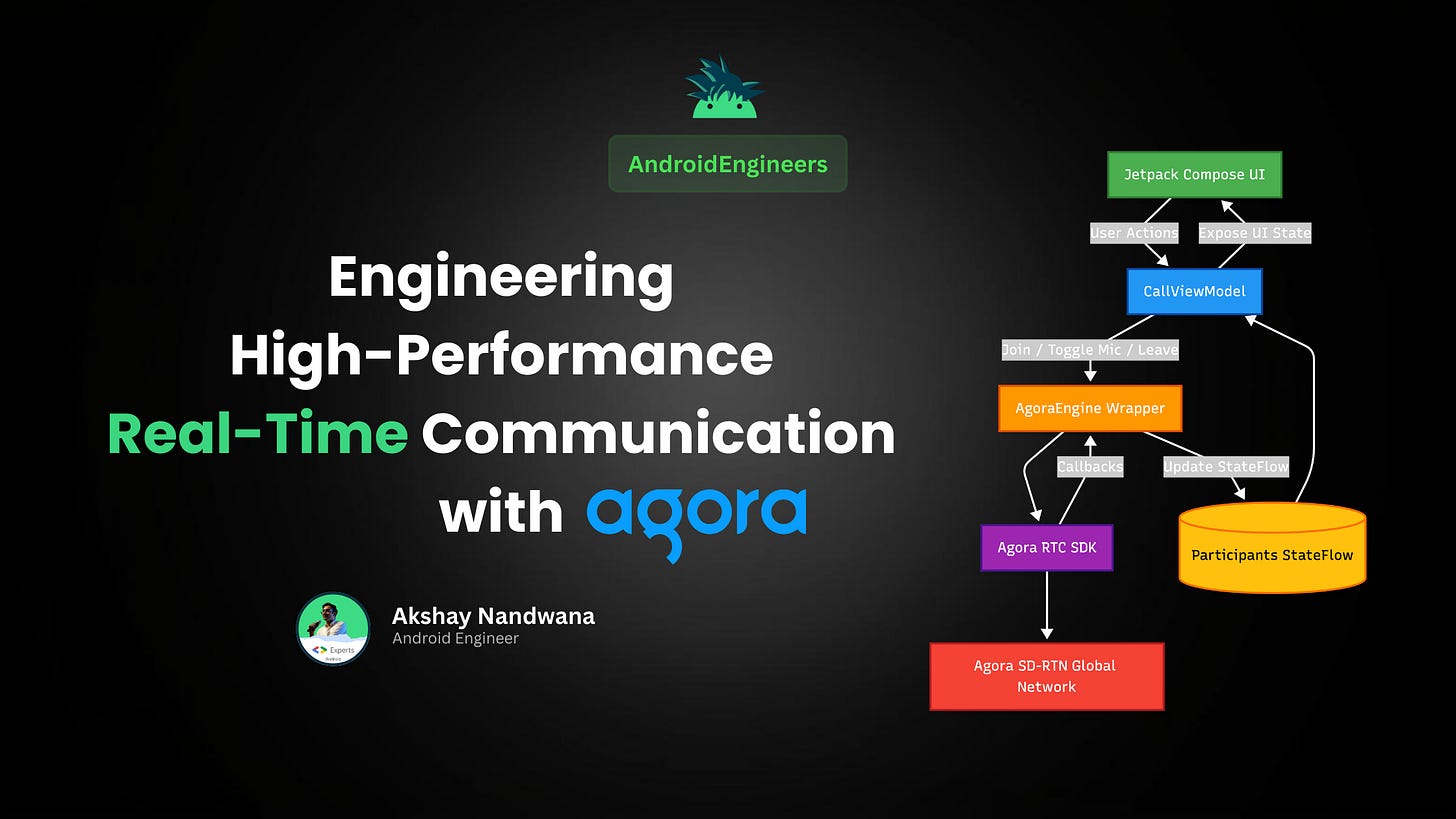
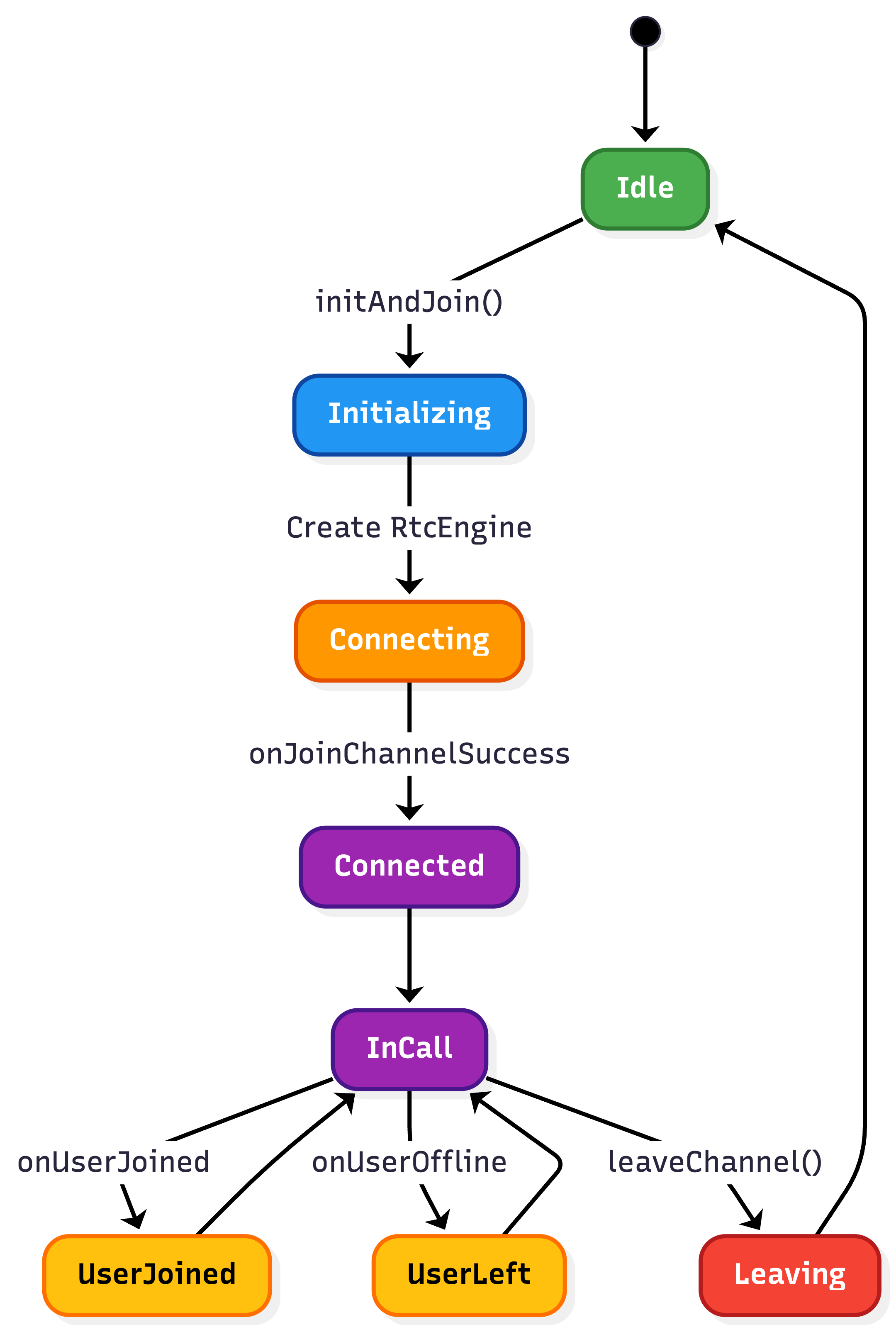
The Agora SDK is callback-based and uses native threads. We’ll wrap it in an AgoraEngine class that exposes Kotlin StateFlows for the UI to observe.
The AgoraEngine.kt Implementation
class AgoraEngine {

    private var rtcEngine: RtcEngine? = null

    private val _participants =
        MutableStateFlow<Map<Int, Participant>>(emptyMap())
    val participants = _participants.asStateFlow()

    private val _connectionState =
        MutableStateFlow<ConnectionState>(ConnectionState.Disconnected)
    val connectionState = _connectionState.asStateFlow()

    private val eventHandler = object : IRtcEngineEventHandler() {

        override fun onJoinChannelSuccess(
            channel: String?,
            uid: Int,
            elapsed: Int
        ) {
            _connectionState.value = ConnectionState.Connected

            _participants.update {
                it + (uid to Participant(uid = uid, isLocal = true))
            }
        }

        override fun onUserJoined(uid: Int, elapsed: Int) {
            _participants.update {
                it + (uid to Participant(uid = uid))
            }
        }

        override fun onUserOffline(uid: Int, reason: Int) {
            _participants.update {
                it - uid
            }
        }

        override fun onAudioVolumeIndication(
            speakers: Array<out AudioVolumeInfo>?,
            totalVolume: Int
        ) {
            _participants.update { current ->
                current.mapValues { (uid, p) ->
                    p.copy(
                        isSpeaking = speakers?.any {
                            it.uid == uid || (it.uid == 0 && p.isLocal)
                        } ?: false
                    )
                }
            }
        }
    }

    fun initialize(context: Context, appId: String) {
        val config = RtcEngineConfig().apply {
            mContext = context.applicationContext
            mAppId = appId
            mEventHandler = eventHandler
        }

        rtcEngine = RtcEngine.create(config)

        rtcEngine?.enableAudioVolumeIndication(
            200,
            3,
            true
        )
    }

    fun joinChannel(
        token: String?,
        channelName: String,
        mode: CallMode
    ) {
        val options = ChannelMediaOptions().apply {
            channelProfile = Constants.CHANNEL_PROFILE_COMMUNICATION
            clientRoleType = Constants.CLIENT_ROLE_BROADCASTER

            publishMicrophoneTrack = true
            autoSubscribeAudio = true

            if (mode == CallMode.VIDEO) {
                publishCameraTrack = true
                autoSubscribeVideo = true
            }
        }

        rtcEngine?.joinChannel(
            token,
            channelName,
            0,
            options
        )
    }

    fun leaveChannel() {
        rtcEngine?.leaveChannel()
        _participants.value = emptyMap()
    }
}
5. Step 4: Orchestration with the ViewModel
The CallViewModel manages the call’s lifecycle and UI state. It handles everything from joining the channel to toggling hardware.
class CallViewModel(application: Application) : AndroidViewModel(application) {

    private val engine = AgoraEngine()

    private val _uiState = MutableStateFlow(CallUiState())
    val uiState = _uiState.asStateFlow()

    fun initAndJoin(
        appId: String,
        channel: String,
        mode: CallMode
    ) {
        engine.initialize(getApplication(), appId)

        // Collect engine state and map it to UI state
        viewModelScope.launch {
            engine.participants.collect { list ->
                _uiState.update {
                    it.copy(
                        participants = list.values.toList()
                    )
                }
            }
        }

        engine.joinChannel(
            token = null,
            channelName = channel,
            mode = mode
        )
    }

    fun toggleMic() {
        val newState = !_uiState.value.isMicMuted

        engine.toggleMicrophone(newState)

        _uiState.update {
            it.copy(isMicMuted = newState)
        }
    }

    override fun onCleared() {
        super.onCleared()

        engine.leaveChannel()
        RtcEngine.destroy()
    }
}
6. Step 5: Compose UI Implementation
Now we build the UI. We’ll use AndroidView to render the native SurfaceView video feeds.
Rendering Video Tiles
@Composable
fun VideoTile(
    participant: Participant,
    viewModel: CallViewModel
) {
    val context = LocalContext.current

    val surfaceView = remember(participant.uid) {
        if (participant.isLocal) {
            viewModel.setupLocalVideo(context)
        } else {
            viewModel.setupRemoteVideo(context, participant.uid)
        }
    }

    Box(
        modifier = Modifier
            .fillMaxWidth()
            .aspectRatio(4f / 3f)
            .clip(RoundedCornerShape(12.dp))
            .background(Color.Black)
    ) {

        AndroidView(
            factory = { surfaceView },
            modifier = Modifier.fillMaxSize()
        )

        // Overlay: participant name + speaking indicator
        Row(
            modifier = Modifier
                .align(Alignment.BottomStart)
                .padding(8.dp),
            verticalAlignment = Alignment.CenterVertically
        ) {

            Text(
                text = "User ${participant.uid}",
                color = Color.White
            )

            if (participant.isSpeaking) {
                Spacer(modifier = Modifier.width(6.dp))

                Icon(
                    imageVector = Icons.Default.Mic,
                    contentDescription = null,
                    tint = Color.Green
                )
            }
        }
    }
}
7. Performance Monitoring: The RtcStats API
Senior engineers don’t just ship code; they monitor it. Agora’s onRtcStats provides critical data for observability.
Key Metrics to Monitor:
- Last-Mile Delay: The time it takes for a packet to travel from the device to the first SD-RTN node.
- Jitter: Variation in the delay of received packets. High jitter leads to choppy audio.
- CPU Usage: Native SDKs can be CPU-intensive. Monitoring
cpuTotalUsagehelps identify thermal throttling on older devices. - Bitrate: Tracking
txBitrateandrxBitratehelps you understand the bandwidth conditions your users are facing.
8. Resource Lifecycle & Memory Safety
Android lifecycle management is a common source of bugs in RTC apps. When a user finishes a call, you must release hardware resources immediately. Failure to do so will block other apps (like the Camera or Phone app) from functioning.
The onCleared Pattern
override fun onCleared() {
    super.onCleared()

    // 1. Leave the channel to signal others you are gone
    rtcEngine?.leaveChannel()

    // 2. Stop native preview to release camera hardware
    rtcEngine?.stopPreview()

    // 3. Destroy the engine instance completely from memory
    RtcEngine.destroy()
    rtcEngine = null
}
9. Security: Token-Based Authentication
Never hardcode tokens or use “No Certificate” mode in production. Agora uses HMAC-SHA256 tokens to authorize users securely.
The Token Workflow:
- Request: The App requests a token from your backend server.
- Generate: Your backend uses your App ID, App Certificate, Channel Name, and User UID to generate a signed token.
- Authorize: The App passes this token to
joinChannel. Agora’s SD-RTN validates the signature before allowing the connection.
10. The Senior Engineer’s Checklist for Production
- Audio Routing: Handle the switch between earpiece, speakerphone, and Bluetooth headsets automatically using
onAudioRoutingChanged. - Foreground Service: For calling apps, Android requires a Foreground Service to keep the connection alive when the app is minimized. Use
NotificationCompatwith a “Back to Call” action. - Battery Optimization: Use
enableAudioVolumeIndicationsparingly (e.g., every 500ms instead of 100ms) to save battery life. - Proactive Network Feedback: Use
onNetworkQualityto show the user a warning (e.g., “Your connection is unstable”) before the call actually drops. This improves perceived quality. - Hardware Fallbacks: Ensure your app handles the scenario where the camera or microphone is currently in use by another high-priority application.
11. What’s Next: Moving to Compose Multiplatform (CMP)
The architecture we’ve built—separating the Engine logic into a wrapper—is the first step toward cross-platform parity. The next logical step for a senior engineer is to migrate this to Compose Multiplatform.
By using Kotlin Multiplatform (KMP), you can share the entire CallViewModel and UI logic between Android and iOS. You simply define an expect class AgoraEngine in your commonMain and provide the actual implementations for each platform using the respective Agora SDKs.
Conclusion
Implementing professional-grade real-time communication is a journey into the depths of native platform capabilities and global networking. By leveraging Agora’s SD-RTN and combining it with the reactive power of Jetpack Compose, you can build an application that is not only robust and scalable but also a joy to maintain.
Resources
- Agora Android SDK Documentation
- Agora Token Server Implementation Guide
- Deep Dive: Video Encoding Best Practices
Are you ready to build the future of real-time engagement? 🚀


