
When I first saw the possibilities of voice-driven development tools, I knew we had to build something that would blow developers’ minds at LA Tech Week. Not just another chatbot, but a real-time coding assistant that listens to your voice and generates working web apps instantly.
This guide walks you through how we built it using Agora’s Conversational AI platform, so you can create your own. You’ll learn the architecture decisions, the tricky parts we solved, and how to build your own voice-powered coding assistant.
What We’re Building
An AI coding assistant that:
- Listens to your voice using Agora RTC (Real-Time Communication)
- Processes your requests through GPT-4o
- Responds with natural speech via Azure TTS
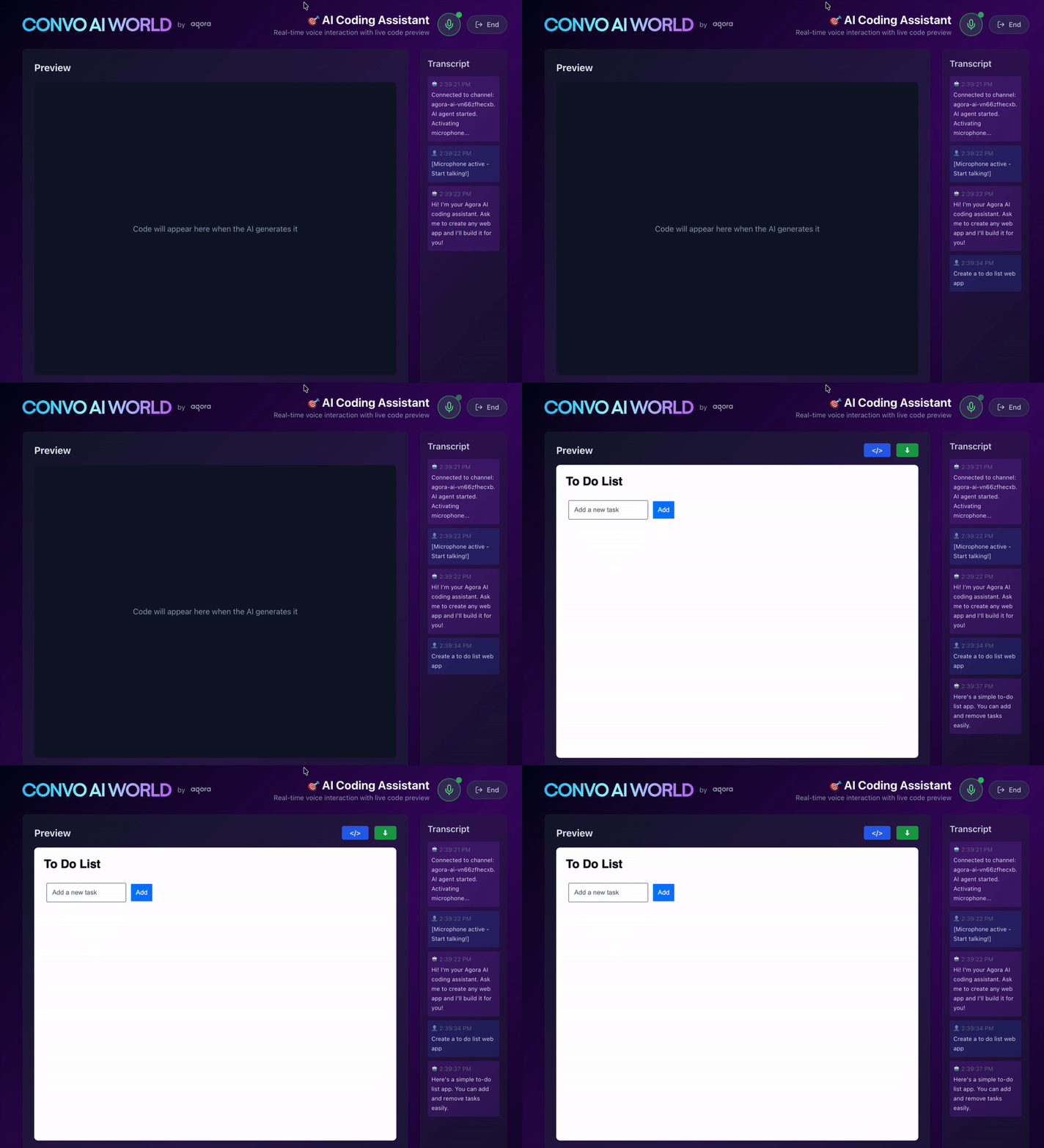
- Generates HTML/CSS/JavaScript code that renders live in your browser
- Keeps preview and code visible even after ending the session
Prerequisites
To build this voice-powered AI coding assistant, you’ll need:
- A valid Agora account. If you don’t have one, see Get started with Agora.
- An Agora project with App Certificate enabled and access to Conversational AI features
- OpenAI API key with access to GPT-4o
- Node.js 18+ and npm installed
- Basic understanding of React, Next.js, and TypeScript
- A modern browser (Chrome or Edge recommended for best microphone support)
Project Setup
To set up your development environment:
1. Create a new Next.js project with TypeScript:
2. Install required Agora SDKs:
- Configure your
.env.localwith your credentials:
Your project structure should look like this:
agora-ai-assistant/
├── app/
│   ├── api/
│   │   ├── token/
│   │   │   └── route.ts
│   │   ├── start-agent/
│   │   │   └── route.ts
│   │   └── leave-agent/
│   │       └── route.ts
│   ├── page.tsx
│   └── layout.tsx
├── lib/
│   └── agora-client.ts
├── .env.local
└── package.json
Architecture Overview
Key Components
- Frontend (Next.js + React): Handles UI, state management, and real-time preview
- Agora RTC SDK: Bidirectional audio streaming
- Agora Signaling SDK: Real-time messaging for transcripts
- Agora Conversational AI: Orchestrates ASR → LLM → TTS pipeline
- API Routes: Server-side token generation and agent management
The Flow: From Voice to Code
Let me walk you through what happens when a user says “Create a calculator”:
1. Session Initialization
// User clicks "Start Session" → handleConnect() fires
const handleConnect = async () => {
  // Generate unique channel name
  const channel = `agora-ai-${Math.random().toString(36).substring(2, 15)}`;
  // Get RTC token with both RTC and RTM2 privileges
    const response = await fetch("/api/token", {
      method: "POST",
      body: JSON.stringify({ channelName: channel, uid }),
    });
    // Start the AI agent
    const agentResponse = await fetch("/api/start-agent", {
      method: "POST",
      body: JSON.stringify({ channelName: channel, uid }),
    });
    // Initialize Agora client and join channel
    const client = new AgoraConversationalClient(/* ... */);
    await client.initialize();
  };
Why this matters: We generate a random channel name for each session to ensure isolation. The token has both RTC (for audio) and Signaling (for messages) privileges baked in, so we only need one token instead of managing two separately.
2. Token Generation (Server-Side)
The /api/token route generates a secure token that never exposes your App Certificate to the client:
// app/api/token/route.ts
export async function POST(request: NextRequest) {
  const { channelName, uid } = await request.json();

// Build token with BOTH RTC and Signaling (RTM) privileges
  const token = RtcTokenBuilder.buildTokenWithRtm2(
    appId,
    appCertificate,
    channelName,
    uid, // RTC account (numeric)
    RtcRole.PUBLISHER,
    3600, // 1 hour expiration
    3600,
    3600,
    3600,
    3600, // RTC privileges
    String(uid), // RTM user ID (string)
    3600 // RTM privilege
  );
  return NextResponse.json({ token });
}
Security note: Always generate tokens server-side. Your App Certificate should never touch the browser.
3. Starting the Conversational AI Agent
This is where the magic happens. The /api/start-agent route configures the entire AI pipeline:
// app/api/start-agent/route.ts
const requestBody = {
  name: `agent-${channelName}-${Date.now()}`,
  properties: {
    channel: channelName,
    token: botToken,
    agent_rtc_uid: botUid,
    remote_rtc_uids: ["*"], // Listen to all users in channel
    // Enable smart features
    advanced_features: {
      enable_aivad: true, // AI Voice Activity Detection (interruption)
      enable_rtm: true, // Real-time messaging for transcripts
    },
    // ASR: Speech-to-text
    asr: {
      language: "en-US",
      vendor: "ares", // Agora's ASR engine
    },
    // TTS: Text-to-speech
    tts: {
      vendor: "microsoft",
      params: {
        voice_name: "en-US-AndrewMultilingualNeural",
      },
      skip_patterns: [2], // Skip content in 【】 brackets
    },
    // LLM: The brain
    llm: {
      url: "https://api.openai.com/v1/chat/completions",
      api_key: llmApiKey,
      system_messages: [
        {
          role: "system",
          content: "You are an expert web development AI assistant...",
        },
      ],
      params: {
        model: "gpt-4o",
      },
    },
  },
};
The skip_patterns trick: Notice skip_patterns: [2]? This tells the TTS engine to skip content wrapped in black lenticular brackets 【】. That's how we prevent the AI from reading aloud 500 lines of HTML code.
4. The Critical System Prompt
Here’s the system prompt that makes the code generation work:
You are an expert web development AI assistant. Keep spoken responses SHORT and concise.

IMPORTANT: When you generate HTML/CSS/JS code, you MUST wrap it in black lenticular brackets like this:
【<!DOCTYPE html><html>...</html>】
The black lenticular brackets【】 are REQUIRED - they tell the system to render the code visually instead of speaking it.
RULES:
1. Code must be wrapped in black lenticular brackets: 【<!DOCTYPE html><html>...</html>】
2. Put ONLY the raw HTML code inside 【】 - NO markdown code fences like ```html
3. Start with <!DOCTYPE html> or <html immediately after the opening 【
4. Text outside 【】 will be spoken aloud - KEEP IT BRIEF
5. Make code self-contained with inline CSS in <style> tags and JS in <script> tags
6. Use modern, clean design with good UX practices
7. For images, use https://picsum.photos/
CORRECT EXAMPLE:
Here's a button 【<!DOCTYPE html><html>...</html>】 that shows an alert.
WRONG EXAMPLE:
【```html
<!DOCTYPE html>...
```】
Why black lenticular brackets? Regular brackets [] conflict with JavaScript arrays and JSON. Markdown fences break the TTS skip pattern. black lenticular brackets are unique, rarely appear in natural conversation, and work perfectly with skip_patterns: [2].
5. Real-Time Audio & Messaging
Once the agent joins the channel, we establish two parallel connections:
RTC Connection (Audio)
// lib/agora-client.ts
async initialize() {
  // Create RTC client for audio
  this.client = AgoraRTC.createClient({ mode: "rtc", codec: "vp8" });

  // Listen for bot's audio
  this.client.on("user-published", async (user, mediaType) => {
    await this.client.subscribe(user, mediaType);
    if (mediaType === "audio" && user.uid === this.botUid) {
      user.audioTrack?.play(); // Play AI's voice
    }
  });
  // Join channel
  await this.client.join(this.appId, this.channel, this.token, this.uid);
  // Start sending our voice
  this.localAudioTrack = await AgoraRTC.createMicrophoneAudioTrack();
  await this.client.publish([this.localAudioTrack]);
}
Signaling Connection (RTM for Messages)
// lib/agora-client.ts
private async initializeRTM() {
  const { RTM } = AgoraRTM;
  // Create RTM client (uses same token)
  this.rtmClient = new RTM(this.appId, String(this.uid), {
    useStringUserId: true,
  });
  await this.rtmClient.login({ token: this.token });
  await this.rtmClient.subscribe(this.channel, {
    withMessage: true,
    withPresence: true,
  });
  // Listen for transcription messages
  this.rtmClient.addEventListener("message", (event) => {
    const data = JSON.parse(event.message);
    // Detect message type
    const isAgent = data.object === "assistant.transcription";
    const isFinal = data.turn_status === 1 || data.final === true;
    // Send to UI callback
    if (this.onTranscription) {
      this.onTranscription({
        type: isAgent ? "agent" : "user",
        text: data.text,
        isFinal: isFinal,
        timestamp: Date.now(),
      });
    }
  });
}
Why two connections? RTC handles the actual audio streaming (low-latency, high-quality voice). Signaling sends structured data like transcriptions, which we need for displaying the conversation and detecting code blocks.
6. Parsing the AI’s Response
When the AI responds, we need to:
- Separate spoken text from code
- Display spoken text in the transcript
- Render code in the preview pane
// app/page.tsx
const parseAgentResponse = (text: string) => {
  // Regex to find content between 【】
  const codeRegex = /【[\s\S]*?】/gi;
  const codes: string[] = [];
    let spokenText = text;
    // Extract all code blocks
    const matches = Array.from(text.matchAll(codeRegex));
    for (const match of matches) {
      // Remove the 【】 brackets
      let content = match[0].slice(1, -1);
      // Clean up any markdown fences if AI added them
      content = content.replace(/^```[\w]*\n?/g, "").replace(/```$/g, "");
      content = content.trim();
      // Validate it's HTML
      if (content.includes("<html") || content.includes("<!DOCTYPE")) {
        codes.push(content);
        spokenText = spokenText.replace(match[0], ""); // Remove from spoken text
      }
    }
    return {
      spokenText: spokenText.trim(), // Text to display
      codes, // Code to render
    };
  };
7. Smart Loading Indicators
Users need to know when the AI is generating code. We detect this by watching for the black lenticular opening bracket:
// Set up transcription callback
client.setTranscriptionCallback((message) => {
  const { spokenText, codes } = parseAgentResponse(message.text);
  // Detect code generation in progress
    const hasBlackLenticularOpenBracket = message.text?.includes("【");
    if (message.type === "agent" && hasBlackLenticularOpenBracket) {
      if (!message.isFinal) {
        // AI is streaming code - show loading spinner
        setIsGeneratingCode(true);
      } else {
        // Code generation complete
        setIsGeneratingCode(false);
      }
    }
    // Display spoken text in transcript (only final messages)
    if (spokenText && message.isFinal) {
      setTranscript((prev) => [
        ...prev,
        {
          type: message.type,
          text: spokenText,
          timestamp: new Date(),
        },
      ]);
    }
    // Render code in preview (only final messages)
    if (codes.length > 0 && message.isFinal) {
      codes.forEach((code) => {
        setCodeBlocks((prev) => [...prev, { html: code, timestamp: new Date() }]);
        setCurrentCode(code);
      });
    }
  });
Why check for isFinal? The AI streams responses word-by-word. We don't want to display partial sentences or render incomplete code. Only when isFinal is true do we know we have the complete message.
8. Safe Code Preview
Generated code runs in a sandboxed iframe to prevent XSS attacks:
<iframe
  srcDoc={currentCode}
  title="Code Preview"
  sandbox="allow-scripts allow-forms allow-modals allow-popups allow-same-origin"
  style={{ display: "block", overflow: "auto" }}
/>
Security layers:
sandboxattribute restricts what the code can doallow-scriptslets JS run (needed for interactivity)allow-same-originenables localStorage but still isolates from parent page- No
allow-top-navigationmeans code can't redirect the main page
9. Graceful Disconnection
When the user clicks “End”, we properly clean up resources:
const handleDisconnect = async () => {
  // Stop the AI agent
  if (agentId) {
    await fetch("/api/leave-agent", {
      method: "POST",
      body: JSON.stringify({ agentId }),
    });
  }
  // Disconnect Agora client
    if (agoraClientRef.current) {
      await agoraClientRef.current.disconnect();
      agoraClientRef.current = null;
    }
    // Reset connection state but KEEP the preview and code
    setIsConnected(false);
    setIsMicActive(false);
    setTranscript([]);
    // Note: We DON'T clear codeBlocks or currentCode here
  };
New behavior: The preview and code remain visible after ending the session. This lets users examine the results without the session running. Only when starting a new session do we reset everything.
10. Version Control

The app tracks all code iterations, so users can roll back:
{/...}
{
  codeBlocks.length > 1 && (
    <select
      value={codeBlocks.findIndex((b) => b.html === currentCode)}
      onChange={(e) => {
        const idx = parseInt(e.target.value);
        setCurrentCode(codeBlocks[idx].html);
      }}
    >
      {codeBlocks.map((block, idx) => (
        <option key={block.id} value={idx}>
          v{idx + 1} - {new Date(block.timestamp).toLocaleTimeString()}
        </option>
      ))}
    </select>
  );
}
This dropdown appears when the AI has generated multiple versions, letting users compare iterations.
Key Implementation Details
Token Management
Both the user and the bot need tokens and both use buildTokenWithRtm2() (because we need RTM for transcripts), But they’re generated at different times:
User Token (/api/token): Has its own endpoint
- Generated per session with random UID
- Has both RTC + Signaling (RTM) privileges
- Used by browser to join channel
Bot Token (/api/start-agent): Passed during start request
- Generated with fixed
NEXT_PUBLIC_AGORA_BOT_UID - Also has RTC + Signaling (RTM) privileges
- Token is sent to Agora’s Conversational AI service
Managing Audio State
The microphone has multiple states:
- Not started: No audio track exists
- Active: Publishing audio to channel
- Muted: Audio track exists but disabled
// Start microphone
async startMicrophone() {
  this.localAudioTrack = await AgoraRTC.createMicrophoneAudioTrack({
    encoderConfig: "speech_standard", // Optimize for voice
  });
  await this.client.publish([this.localAudioTrack]);
}
// Mute (keeps track alive)
async setMuted(muted: boolean) {
  if (this.localAudioTrack) {
    await this.localAudioTrack.setEnabled(!muted);
  }
}
// Stop completely
async stopMicrophone() {
  if (this.localAudioTrack) {
    this.localAudioTrack.stop();
    this.localAudioTrack.close();
    this.localAudioTrack = null;
  }
}
Why this separation? Muting is fast and reversible (UI toggle). Stopping destroys the track and requires re-initializing the microphone (might trigger permission prompt).
Handling Interruptions
The enable_aivad: true setting enables AI Voice Activity Detection:
advanced_features: {
  enable_aivad: true,  // Let user interrupt the AI
},
vad: {
  mode: "interrupt",
  interrupt_duration_ms: 160,     // How long user speaks to interrupt
  silence_duration_ms: 640,       // Silence before AI responds
},
This creates natural back-and-forth conversations. If the AI starts talking but you interrupt with “wait, stop”, it actually stops and listens.
Code Formatting
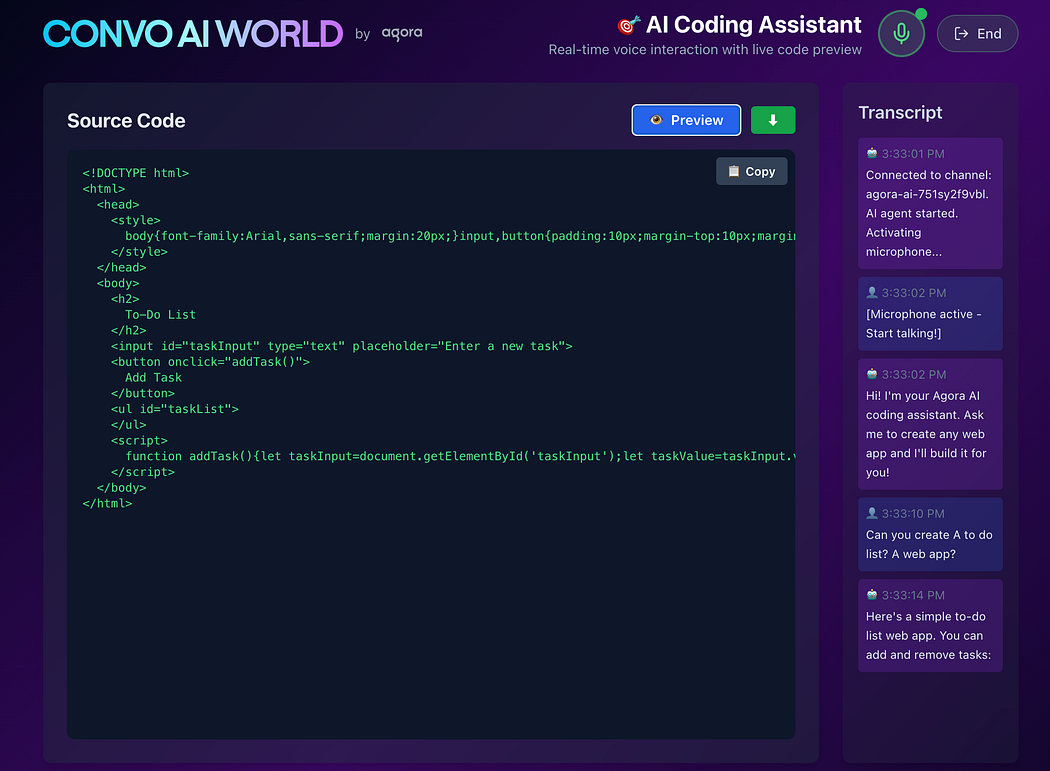
Raw AI-generated HTML is often minified. We format it for readability:
function formatHTML(html: string): string {
  let formatted = "";
  let indent = 0;
  const tab = "  ";
  html.split(/(<[^>]+>)/g).forEach((token) => {
      if (!token.trim()) return;
      if (token.startsWith("</")) {
        // Closing tag - decrease indent
        indent = Math.max(0, indent - 1);
        formatted += "\n" + tab.repeat(indent) + token;
      } else if (token.startsWith("<") && !token.endsWith("/>")) {
        // Opening tag - add then increase indent
        formatted += "\n" + tab.repeat(indent) + token;
        if (!token.match(/<(br|hr|img|input|meta|link)/i)) {
          indent++;
        }
      } else {
        // Text content
        const trimmed = token.trim();
        if (trimmed) {
          formatted += "\n" + tab.repeat(indent) + trimmed;
        }
      }
    });
    return formatted.trim();
  }
This is used in the “Source Code” view to make the HTML readable.
Common Pitfalls & Solutions
Issue 1: AI Reads Code Aloud
Problem: Without skip_patterns, the AI will attempt to speak every character of HTML code. It sounds like gibberish and takes forever.
Solution:
tts: {
  skip_patterns: [2],  // Pattern 2 = black lenticular bracket【】
}
And ensure your system prompt explicitly tells the AI to use these brackets.
Issue 2: Code Not Rendering
Problem: AI generates code but nothing appears in preview
Checklist:
- Check browser console for
parseAgentResponselogs - Verify the AI is using 【】 brackets (check transcript)
- Look for
<!DOCTYPE html>or<htmlin the code - Ensure
isFinalis true before rendering
Issue 3: Bot Not Speaking
Problem: Can see transcript but hear no audio
Solutions:
- Verify
NEXT_PUBLIC_AGORA_BOT_UIDmatches your start-agent config - Check that bot UID is subscribed in RTC
user-publishedevent - Ensure browser audio isn’t muted
- Look for “Bot disconnected” logs
Issue 5: Microphone Won’t Start
Problem: “Permission denied” or “No microphone found”
Solutions:
- Check browser permissions (should prompt automatically)
- Ensure another app isn’t using the microphone
- Try in a different browser (Chrome/Edge recommended)
- Use HTTPS in production (required for
getUserMedia)
Deployment Considerations
Environment Variables
Never commit these to git:
# .env.local (DO NOT COMMIT)
NEXT_PUBLIC_AGORA_APP_ID=abc123...
AGORA_APP_CERTIFICATE=xyz789...
AGORA_CUSTOMER_ID=cust123...
AGORA_CUSTOMER_SECRET=secret456...
NEXT_PUBLIC_AGORA_BOT_UID=1001
LLM_URL=https://api.openai.com/v1/chat/completions
LLM_API_KEY=sk-...
TTS_API_KEY=...
TTS_REGION=eastus
For production:
- Set these in your hosting platform (Vercel, Netlify, AWS, etc.)
- Use separate Agora projects for dev/staging/prod
- Rotate secrets regularly
Build & Deploy
# Install dependencies
npm install
# Build production bundle
npm run build
# Start production server
npm start
The app is fully server-side rendered with Next.js. Static pages are pre-rendered, API routes run on-demand.
Testing Locally
Quick Start
# 1. Clone the repo
git clone https://github.com/AgoraIO-Community/Agora-Conversational-AI-Coding-Assistant.git
cd Agora-Conversational-AI-Coding-Assistant
# 2. Install dependencies
npm install
# 3. Create .env.local with your credentials
cp .env.example .env.local
# Edit .env.local with your actual keys
# 4. Start dev server
npm run dev
# 5. Open http://localhost:3000
Debugging Tips
Enable verbose logging:
// lib/agora-client.ts
AgoraRTC.setLogLevel(0); // 0 = debug, 4 = none
Monitor network traffic:
- Open browser DevTools → Network tab
- Filter by “WS” to see WebSocket connections
- Check
/api/tokenand/api/start-agentresponses
Check RTM messages: All RTM messages are logged to console with:
Look for object: "assistant.transcription" for AI responses.
Extending the App
Add Code Export
Want to download as a complete project instead of just HTML?
import JSZip from "jszip";

async function exportProject(html: string) {
  const zip = new JSZip();
  // Extract inline CSS
  const cssMatch = html.match(/<style>([\s\S]*?)<\/style>/);
  const css = cssMatch ? cssMatch[1] : "";
  // Extract inline JS
  const jsMatch = html.match(/<script>([\s\S]*?)<\/script>/);
  const js = jsMatch ? jsMatch[1] : "";
  // Create separate files
  zip.file("index.html", html);
  if (css) zip.file("styles.css", css);
  if (js) zip.file("script.js", js);
  zip.file("README.md", "# Generated by AI Coding Assistant");
  // Download
  const blob = await zip.generateAsync({ type: "blob" });
  const url = URL.createObjectURL(blob);
  const a = document.createElement("a");
  a.href = url;
  a.download = `project-${Date.now()}.zip`;
  a.click();
}
Add Syntax Highlighting

Install Prism.js for colorful syntax highlights:
import Prism from "prismjs";
import "prismjs/themes/prism-tomorrow.css";

function SourceCodeView({ code }: { code: string }) {
  const highlighted = Prism.highlight(
    formatHTML(code),
    Prism.languages.html,
    "html"
  );
  return (
    <pre className="language-html">
      <code dangerouslySetInnerHTML={{ __html: highlighted }} />
    </pre>
  );
}
Add Multi-Language Support
The ASR and TTS support multiple languages:
// In start-agent route
asr: {
  language: userSelectedLanguage, // "en-US", "es-ES", "zh-CN", etc.
  vendor: "ares",
},
tts: {
  vendor: "microsoft",
  params: {
    voice_name: getVoiceForLanguage(userSelectedLanguage),
  },
},
Voice options (for Microsoft Azure TTS):
- English:
en-US-AndrewMultilingualNeural - Spanish:
es-ES-AlvaroNeural - French:
fr-FR-HenriNeural - Chinese:
zh-CN-YunxiNeural
See Azure TTS voice list for all options.
Performance Optimizations
Reduce Initial Load Time
Use dynamic imports:
// Instead of:
import AgoraRTC from "agora-rtc-sdk-ng";

// Use:
const AgoraRTC = await import("agora-rtc-sdk-ng");
This is already done in handleConnect:
const AgoraModule = await import("@/lib/agora-client");
const client = new AgoraModule.AgoraConversationalClient(/* ... */);
Optimize Re-renders
Code blocks can be large. Memoize the preview:
import { memo } from "react";

const CodePreview = memo(({ code }: { code: string }) => {
  return (
    <iframe
      srcDoc={code}
      title="Code Preview"
      sandbox="allow-scripts allow-forms allow-modals"
    />
  );
});
Looking Ahead
Building this voice-powered coding assistant taught me that the future of development tools isn’t just about writing code faster — it’s about removing the barrier between thinking and building.
When you can say “create a todo list” and see a working app 10 seconds later, you’re not just saving time. You’re freeing your mind to focus on the creative parts: the UX, the interactions, the problem you’re actually solving.
If you build something with this architecture, I’d love to see it. Tag @AgoraIO and show us what you create.
Now stop reading and start building. 🚀
Live Demo
Resources
- Full code on Github
- Agora Conversational AI Docs
- Agora RTC SDK Reference
- Agora Signaling SDK Reference
- Azure TTS Voice Gallery
- OpenAI API Reference
- Agora Community Discord
Built with ❤️ by the Agora team.


