

대화형 AI는 사람들이 인공지능과 상호작용하는 방식을 혁신하고 있습니다. 사용자는 텍스트 프롬프트를 세심하게 작성하는 대신 AI 에이전트와 자연스럽고 실시간 음성 대화를 나눌 수 있습니다. 이는 직관적이고 효율적인 상호작용의 새로운 기회를 열어줍니다.
많은 개발자들이 텍스트 기반 에이전트를 위해 맞춤형 LLM 워크플로우를 구축하는 데 상당한 시간을 투자해 왔습니다. Agora의 대화형 AI 엔진은 기존 워크플로우를 Agora 채널에 연결하여 현재 AI 인프라를 포기하지 않고도 실시간 음성 대화를 가능하게 합니다.
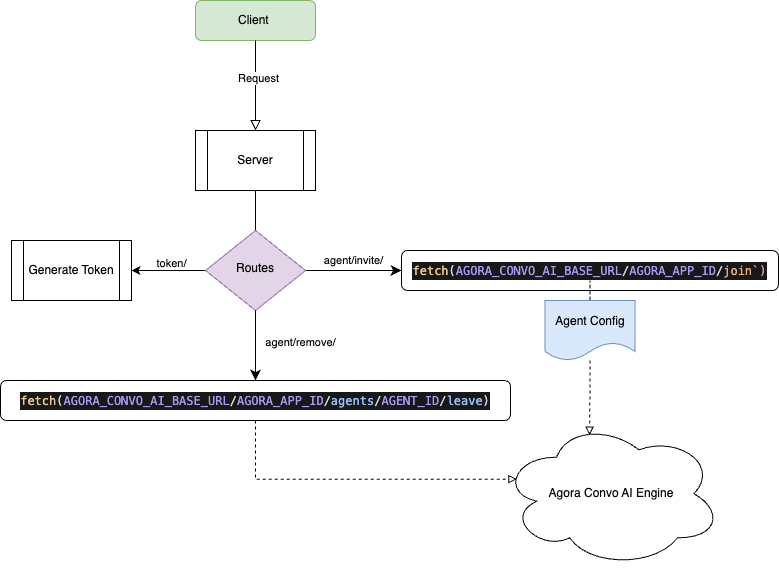
이 가이드에서는 사용자와 Agora의 대화형 AI 사이의 연결을 처리하는 Go 서버를 구축하는 방법을 단계별로 안내합니다. 완료 시에는 애플리케이션에 음성 기반 AI 대화를 지원할 수 있는 생산 환경에 적합한 백엔드를 확보하게 됩니다.
필수 조건
시작하기 전에 다음을 확인하세요:
- Go (버전 1.18 이상)
- Go 및 Gin 프레임워크에 대한 기본 지식
- Agora 계정 — 매월 첫 10,000분은 무료입니다
- Conversational AI 서비스가 AppID에 활성화되어 있어야 합니다
프로젝트 설정
필요한 의존성을 설치하여 Golang 프로젝트를 설정해 보겠습니다. 먼저 새로운 디렉토리를 생성하고 Go 모듈을 초기화합니다:
mkdir agora-convo-ai-go-servercd agora-convo-ai-go-servergo mod init github.com/AgoraIO-Community/convo-ai-go-server
다음으로 서버에 필요한 주요 의존성을 추가합니다:
go get github.com/gin-gonic/gingo get github.com/joho/godotenvgo get github.com/AgoraIO-Community/go-tokenbuilder
초기 디렉토리 구조를 생성하고, 가이드를 진행하면서 필요한 파일을 이 디렉토리에 추가해 나갈 것입니다.
mkdir -p convoai token_service http_headers validationtouch .env
프로젝트 디렉토리는 다음과 같은 구조를 갖게 됩니다:
├── convoai/├── token_service/├── http_headers/├── validation/├── .env├── go.mod├── go.sum
서버 진입점
먼저 서버의 진입점이 될 주요 애플리케이션 파일을 설정합니다. 환경 변수를 로드하고 구성 설정을 수행한 후 적절한 미들웨어와 라우트를 설정하여 라우터를 초기화합니다.
main.go 파일을 생성합니다:
touch main.gopackage main
import (
"context"
"log"
"net/http"
"os"
"os/signal"
"syscall"
"time"
"github.com/gin-gonic/gin"
"github.com/joho/godotenv"
)
func loadConfig() (*convoai.ConvoAIConfig, error) {
config := &convoai.ConvoAIConfig{
// Agora Configuration
AppID: os.Getenv("AGORA_APP_ID"),
AppCertificate: os.Getenv("AGORA_APP_CERTIFICATE"),
CustomerID: os.Getenv("AGORA_CUSTOMER_ID"),
CustomerSecret: os.Getenv("AGORA_CUSTOMER_SECRET"),
BaseURL: os.Getenv("AGORA_CONVO_AI_BASE_URL"),
AgentUID: os.Getenv("AGENT_UID"),
// LLM Configuration
LLMModel: os.Getenv("LLM_MODEL"),
LLMURL: os.Getenv("LLM_URL"),
LLMToken: os.Getenv("LLM_TOKEN"),
// TTS Configuration
TTSVendor: os.Getenv("TTS_VENDOR"),
}
// Microsoft TTS Configuration
if msKey := os.Getenv("MICROSOFT_TTS_KEY"); msKey != "" {
config.MicrosoftTTS = &convoai.MicrosoftTTSConfig{
Key: msKey,
Region: os.Getenv("MICROSOFT_TTS_REGION"),
VoiceName: os.Getenv("MICROSOFT_TTS_VOICE_NAME"),
Rate: os.Getenv("MICROSOFT_TTS_RATE"),
Volume: os.Getenv("MICROSOFT_TTS_VOLUME"),
}
}
// ElevenLabs TTS Configuration
if elKey := os.Getenv("ELEVENLABS_API_KEY"); elKey != "" {
config.ElevenLabsTTS = &convoai.ElevenLabsTTSConfig{
Key: elKey,
VoiceID: os.Getenv("ELEVENLABS_VOICE_ID"),
ModelID: os.Getenv("ELEVENLABS_MODEL_ID"),
}
}
// Modalities Configuration
config.InputModalities = os.Getenv("INPUT_MODALITIES")
config.OutputModalities = os.Getenv("OUTPUT_MODALITIES")
return config, nil
}
func setupServer() *http.Server {
log.Println("Starting setupServer")
if err := godotenv.Load(); err != nil {
log.Println("Warning: Error loading .env file. Using existing environment variables.")
}
// Load configuration
config, err := loadConfig()
if err != nil {
log.Fatal("Failed to load configuration:", err)
}
// TODO: Validate environment configuration
// Server Configuration
serverPort := os.Getenv("PORT")
if serverPort == "" {
serverPort = "8080"
}
// CORS Configuration
corsAllowOrigin := os.Getenv("CORS_ALLOW_ORIGIN")
// Set up router with headers
router := gin.Default()
//TODO: Register headers
// TODO: Initialize services & register routes
// Register healthcheck route
router.GET("/ping", Ping)
// Configure and start the HTTP server
server := &http.Server{
Addr: ":" + serverPort,
Handler: router,
}
log.Println("Server setup completed")
log.Println("- listening on port", serverPort)
return server
}
func main() {
server := setupServer()
// Start the server in a separate goroutine to handle graceful shutdown.
go func() {
if err := server.ListenAndServe(); err != nil && err != http.ErrServerClosed {
log.Fatalf("listen: %s\n", err)
}
}()
// Prepare to handle graceful shutdown.
quit := make(chan os.Signal, 1)
signal.Notify(quit, os.Interrupt, syscall.SIGTERM)
// Wait for a shutdown signal.
<-quit
log.Println("Shutting down server...")
// Attempt to gracefully shutdown the server with a timeout of 5 seconds.
ctx, cancel := context.WithTimeout(context.Background(), 5*time.Second)
defer cancel()
if err := server.Shutdown(ctx); err != nil {
log.Fatal("Server forced to shutdown:", err)
}
log.Println("Server exiting")
}
// Ping is a handler function that serves as a basic health check endpoint.
func Ping(c *gin.Context) {
c.JSON(200, gin.H{
"message": "pong",
})
}참고: 환경 변수에서 PORT를 로드하고 있으며,.env파일에 설정되지 않은 경우 기본값으로8080으로 설정됩니다.
기본 Go 서버를 테스트하려면 다음을 실행하세요:
go run main.go
콘솔에 “Server setup completed”와 “- listening on port 8080”이 표시되어야 합니다.
브라우저에서 http://localhost:8080/ping로 이동하여 서버가 정상적으로 작동하는지 확인할 수 있습니다. 응답으로 {“message”: “pong”}가 표시되어야 합니다.
curl을 사용하여 서버를 테스트하려면 다음 명령어를 실행하세요:
curl http://localhost:8080/ping
응답으로 {“message”: “pong”}가 표시되어야 합니다.
형식 정의
다음으로 ConvoAI 서비스에 필요한 형식을 정의해 보겠습니다. convoai-types.go라는 파일을convoai디렉토리에 생성합니다.
touch convoai/convoai-types.go
다음 형식을 추가합니다:
package convoai

// InviteAgentRequest represents the request body for inviting an AI agent
type InviteAgentRequest struct {
	RequesterID      string   `json:"requester_id"`
	ChannelName      string   `json:"channel_name"`
	RtcCodec         *int     `json:"rtc_codec,omitempty"`
	InputModalities  []string `json:"input_modalities,omitempty"`
	OutputModalities []string `json:"output_modalities,omitempty"`
}

// RemoveAgentRequest represents the request body for removing an AI agent
type RemoveAgentRequest struct {
	AgentID string `json:"agent_id"`
}

// TTSVendor represents the text-to-speech vendor type
type TTSVendor string

const (
	TTSVendorMicrosoft  TTSVendor = "microsoft"
	TTSVendorElevenLabs TTSVendor = "elevenlabs"
)

// TTSConfig represents the text-to-speech configuration
type TTSConfig struct {
	Vendor TTSVendor   `json:"vendor"`
	Params interface{} `json:"params"`
}

// AgoraStartRequest represents the request to start a conversation
type AgoraStartRequest struct {
	Name       string     `json:"name"`
	Properties Properties `json:"properties"`
}

// Properties represents the configuration properties for the conversation
type Properties struct {
	Channel          string    `json:"channel"`
	Token            string    `json:"token"`
	AgentRtcUID      string    `json:"agent_rtc_uid"`
	RemoteRtcUIDs    []string  `json:"remote_rtc_uids"`
	EnableStringUID  bool      `json:"enable_string_uid"`
	IdleTimeout      int       `json:"idle_timeout"`
	ASR              ASR       `json:"asr"`
	LLM              LLM       `json:"llm"`
	TTS              TTSConfig `json:"tts"`
	VAD              VAD       `json:"vad"`
	AdvancedFeatures Features  `json:"advanced_features"`
}

// ASR represents the Automatic Speech Recognition configuration
type ASR struct {
	Language string `json:"language"`
	Task     string `json:"task"`
}

// LLM represents the Language Learning Model configuration
type LLM struct {
	URL              string          `json:"url"`
	APIKey           string          `json:"api_key"`
	SystemMessages   []SystemMessage `json:"system_messages"`
	GreetingMessage  string          `json:"greeting_message"`
	FailureMessage   string          `json:"failure_message"`
	MaxHistory       int             `json:"max_history"`
	Params           LLMParams       `json:"params"`
	InputModalities  []string        `json:"input_modalities"`
	OutputModalities []string        `json:"output_modalities"`
}

// SystemMessage represents a system message in the conversation
type SystemMessage struct {
	Role    string `json:"role"`
	Content string `json:"content"`
}

// LLMParams represents the parameters for the Language Learning Model
type LLMParams struct {
	Model       string  `json:"model"`
	MaxTokens   int     `json:"max_tokens"`
	Temperature float64 `json:"temperature"`
	TopP        float64 `json:"top_p"`
}

// VAD represents the Voice Activity Detection configuration
type VAD struct {
	SilenceDurationMS   int     `json:"silence_duration_ms"`
	SpeechDurationMS    int     `json:"speech_duration_ms"`
	Threshold           float64 `json:"threshold"`
	InterruptDurationMS int     `json:"interrupt_duration_ms"`
	PrefixPaddingMS     int     `json:"prefix_padding_ms"`
}

// Features represents advanced features configuration
type Features struct {
	EnableAIVAD bool `json:"enable_aivad"`
	EnableBHVS  bool `json:"enable_bhvs"`
}

// InviteAgentResponse represents the response for an agent invitation
type InviteAgentResponse struct {
	AgentID  string `json:"agent_id"`
	CreateTS int64  `json:"create_ts"`
	Status   string `json:"status"`
}

// RemoveAgentResponse represents the response for an agent removal
type RemoveAgentResponse struct {
	Success bool   `json:"success"`
	AgentID string `json:"agent_id"`
}

// ConvoAIConfig holds all configuration for the ConvoAI service
type ConvoAIConfig struct {
	// Agora Configuration
	AppID          string
	AppCertificate string
	CustomerID     string
	CustomerSecret string
	BaseURL        string
	AgentUID       string

	// LLM Configuration
	LLMModel string
	LLMURL   string
	LLMToken string

	// TTS Configuration
	TTSVendor     string
	MicrosoftTTS  *MicrosoftTTSConfig
	ElevenLabsTTS *ElevenLabsTTSConfig

	// Modalities Configuration
	InputModalities  string
	OutputModalities string
}

// MicrosoftTTSConfig holds Microsoft TTS specific configuration
type MicrosoftTTSConfig struct {
	Key       string `json:"key"`
	Region    string `json:"region"`
	VoiceName string `json:"voice_name"`
	Rate      string `json:"rate"`
	Volume    string `json:"volume"`
}

// ElevenLabsTTSConfig holds ElevenLabs TTS specific configuration
type ElevenLabsTTSConfig struct {
	Key     string `json:"key"`
	VoiceID string `json:"voice_id"`
	ModelID string `json:"model_id"`
}
이 새로운 유형들은 다음 단계에서 조립할 모든 구성 요소에 대한 이해를 제공합니다. 고객 요청을 받아 AgoraStartRequest를 구성하고 Agora의 대화형 AI 엔진으로 전송합니다. Agora의 Convo AI 엔진은 에이전트를 대화로 추가합니다.
ConvoAI 서비스
유형이 정의되었으니, 대화에서 에이전트를 초대하고 제거하는 에이전트 경로를 구현해 보겠습니다.
convoai-service.go 파일을 생성합니다:
touch convoai/convoai-service.go
gin과 agora-token 라이브러리를 import합니다. 에이전트 토큰을 생성해야 하기 때문입니다. 그 다음 에이전트 경로를 등록하고 설정합니다. 이 함수들은 요청을 해당 핸들러로 전달하기 전에 유효성 검사를 수행합니다.
package convoai

import (
	"net/http"

	"github.com/AgoraIO-Community/convo-ai-go-server/token_service"
	"github.com/gin-gonic/gin"
)

// ConvoAIService handles AI conversation functionality
type ConvoAIService struct {
	config       *ConvoAIConfig
	tokenService *token_service.TokenService
}

// NewConvoAIService creates a new ConvoAIService instance
func NewConvoAIService(config *ConvoAIConfig, tokenService *token_service.TokenService) *ConvoAIService {
	return &ConvoAIService{
		config:       config,
		tokenService: tokenService,
	}
}

// Register the ConvoAI service routes
func (s *ConvoAIService) RegisterRoutes(router *gin.Engine) {
	agent := router.Group("/agent")
	agent.POST("/invite", s.InviteAgent)
	agent.POST("/remove", s.RemoveAgent)
}

// InviteAgent handles the agent invitation request
func (s *ConvoAIService) InviteAgent(c *gin.Context) {
	var req InviteAgentRequest
	if err := c.ShouldBindJSON(&req); err != nil {
		c.JSON(http.StatusBadRequest, gin.H{"error": err.Error()})
		return
	}

	// Validate the request
	if err := s.validateInviteRequest(&req); err != nil {
		c.JSON(http.StatusBadRequest, gin.H{"error": err.Error()})
		return
	}

	// Call the handler
	response, err := s.HandleInviteAgent(req)
	if err != nil {
		c.JSON(http.StatusInternalServerError, gin.H{"error": err.Error()})
		return
	}

	c.JSON(http.StatusOK, response)
}

// RemoveAgent handles the agent removal request
func (s *ConvoAIService) RemoveAgent(c *gin.Context) {
	var req RemoveAgentRequest
	if err := c.ShouldBindJSON(&req); err != nil {
		c.JSON(http.StatusBadRequest, gin.H{"error": err.Error()})
		return
	}

	// Validate the request
	if err := s.validateRemoveRequest(&req); err != nil {
		c.JSON(http.StatusBadRequest, gin.H{"error": err.Error()})
		return
	}

	// Call the handler
	response, err := s.HandleRemoveAgent(req)
	if err != nil {
		c.JSON(http.StatusInternalServerError, gin.H{"error": err.Error()})
		return
	}

	c.JSON(http.StatusOK, response)
}
에이전트 초대 핸들러
다음으로, 여러 핵심 작업을 처리해야 하는 초대 핸들러를 구현합니다:
- AI 에이전트가 RTC 채널에 액세스하기 위한 토큰을 생성합니다.
- 텍스트-투-스피치(Microsoft 또는 ElevenLabs)를 구성합니다.
- AI 에이전트의 프롬프트 및 인사 메시지를 정의합니다.
- 대화 흐름을 제어하는 음성 활동 감지(VAD)를 구성합니다.
- Agora의 Conversational AI 엔진에 시작 요청을 전송합니다.
- Agora의 Convo AI 엔진 응답에서 AgentID를 포함하여 클라이언트에 응답을 반환합니다.
convoai_handler_invite.go 파일을 생성합니다:
convoai/convoai_handler_invite.go를 터치합니다.
다음 내용을 추가합니다:
package convoai

import (
	"bytes"
	"encoding/json"
	"fmt"
	"io"
	"net/http"
	"time"

	"crypto/rand"

	"github.com/AgoraIO-Community/convo-ai-go-server/token_service"
)

// HandleInviteAgent processes the agent invitation request
func (s *ConvoAIService) HandleInviteAgent(req InviteAgentRequest) (*InviteAgentResponse, error) {
	// Generate token for the agent
	tokenReq := token_service.TokenRequest{
		TokenType: "rtc",
		Channel:   req.ChannelName,
		Uid:       "0",
		RtcRole:   "publisher",
	}

	token, err := s.tokenService.GenRtcToken(tokenReq)
	if err != nil {
		return nil, fmt.Errorf("failed to generate token: %v", err)
	}

	// Get TTS config based on vendor
	ttsConfig, err := s.getTTSConfig()
	if err != nil {
		return nil, fmt.Errorf("failed to get TTS config: %v", err)
	}

	// Set up system message for AI behavior
	systemMessage := SystemMessage{
		Role:    "system",
		Content: "You are a helpful assistant. Pretend that the text input is audio, and you are responding to it. Speak fast, clearly, and concisely.",
	}

	// Set default modalities if not provided
	inputModalities := req.InputModalities
	if len(inputModalities) == 0 {
		inputModalities = []string{"text"}
	}

	outputModalities := req.OutputModalities
	if len(outputModalities) == 0 {
		outputModalities = []string{"text", "audio"}
	}

	// Build the request body for Agora Conversation AI service
	agoraReq := AgoraStartRequest{
		Name: fmt.Sprintf("agent-%d-%s", time.Now().UnixNano(), randomString(6)),
		Properties: Properties{
			Channel:         req.ChannelName,
			Token:           token,
			AgentRtcUID:     s.config.AgentUID,
			RemoteRtcUIDs:   getRemoteRtcUIDs(req.RequesterID),
			EnableStringUID: isStringUID(req.RequesterID),
			IdleTimeout:     30,
			ASR: ASR{
				Language: "en-US",
				Task:     "conversation",
			},
			LLM: LLM{
				URL:             s.config.LLMURL,
				APIKey:          s.config.LLMToken,
				SystemMessages:  []SystemMessage{systemMessage},
				GreetingMessage: "Hello! How can I assist you today?",
				FailureMessage:  "Please wait a moment.",
				MaxHistory:      10,
				Params: LLMParams{
					Model:       s.config.LLMModel,
					MaxTokens:   1024,
					Temperature: 0.7,
					TopP:        0.95,
				},
				InputModalities:  inputModalities,
				OutputModalities: outputModalities,
			},
			TTS: *ttsConfig,
			VAD: VAD{
				SilenceDurationMS:   480,
				SpeechDurationMS:    15000,
				Threshold:           0.5,
				InterruptDurationMS: 160,
				PrefixPaddingMS:     300,
			},
			AdvancedFeatures: Features{
				EnableAIVAD: false,
				EnableBHVS:  false,
			},
		},
	}

	// Debug logging
	prettyJSON, _ := json.MarshalIndent(agoraReq, "", "  ")
	fmt.Printf("Sending request to start agent: %s\n", string(prettyJSON))

	// Convert request to JSON
	jsonData, err := json.Marshal(agoraReq)
	if err != nil {
		return nil, fmt.Errorf("failed to marshal request: %v", err)
	}

	// Create the HTTP request
	url := fmt.Sprintf("%s/%s/join", s.config.BaseURL, s.config.AppID)
	fmt.Printf("URL: %s\n", url)
	httpReq, err := http.NewRequest("POST", url, bytes.NewBuffer(jsonData))
	if err != nil {
		return nil, fmt.Errorf("failed to create request: %v", err)
	}

	// Add headers
	httpReq.Header.Set("Content-Type", "application/json")
	httpReq.Header.Set("Authorization", s.getBasicAuth())

	// Send the request using a client with a timeout
	client := &http.Client{Timeout: 30 * time.Second}
	resp, err := client.Do(httpReq)
	if err != nil {
		return nil, fmt.Errorf("failed to send request: %v (URL: %s)", err, url)
	}
	defer resp.Body.Close()

	// Handle response
	if resp.StatusCode != http.StatusOK {
		body, _ := io.ReadAll(resp.Body)
		return nil, fmt.Errorf("failed to start conversation: status=%d, body=%s, url=%s, headers=%v",
			resp.StatusCode, string(body), url, httpReq.Header)
	}

	// Parse the response
	var agoraResp map[string]interface{}
	if err := json.NewDecoder(resp.Body).Decode(&agoraResp); err != nil {
		return nil, fmt.Errorf("failed to decode response: %v", err)
	}

	// Create the response
	response := &InviteAgentResponse{
		AgentID:  agoraResp["agent_id"].(string),
		CreateTS: time.Now().Unix(),
		Status:   "RUNNING",
	}

	return response, nil
}

// getRemoteRtcUIDs returns the appropriate RemoteRtcUIDs array based on the requesterID
func getRemoteRtcUIDs(requesterID string) []string {
	return []string{requesterID}
}

// Add this helper function
func randomString(n int) string {
	const letters = "abcdefghijklmnopqrstuvwxyz"
	b := make([]byte, n)
	rand.Read(b)
	for i := range b {
		b[i] = letters[int(b[i])%len(letters)]
	}
	return string(b)
}
에이전트 핸들러 제거
에이전트가 대화실에 참여한 후에는 해당 에이전트를 대화실에서 제거하는 방법이 필요합니다. 이때 제거 핸들러가 사용됩니다. 이 핸들러는 agentID를 받아 Agora의 Conversational AI 엔진에 요청을 전송하여 에이전트를 채널에서 제거합니다.
convoai_handler_remove.go 파일을 생성합니다:
touch convoai/convoai_handler_remove.go다음 내용을 추가하세요:
package convoai

import (
 "fmt"
 "net/http"
 "time"
)

// HandleRemoveAgent processes the agent removal request
func (s *ConvoAIService) HandleRemoveAgent(req RemoveAgentRequest) (*RemoveAgentResponse, error) {
 // Create the HTTP request
 url := fmt.Sprintf("%s/%s/agents/%s/leave", s.config.BaseURL, s.config.AppID, req.AgentID)
 httpReq, err := http.NewRequest("POST", url, nil)
 if err != nil {
  return nil, fmt.Errorf("failed to create request: %v", err)
 }

 // Add headers
 auth := s.getBasicAuth()
 httpReq.Header.Set("Content-Type", "application/json")
 httpReq.Header.Set("Authorization", auth)
 // Send the request using a client with a timeout
 client := &http.Client{Timeout: 10 * time.Second}
 resp, err := client.Do(httpReq)
 if err != nil {
  return nil, fmt.Errorf("failed to send request: %v", err)
 }
 defer resp.Body.Close()
 if resp.StatusCode != http.StatusOK {
  return nil, fmt.Errorf("failed to remove agent: %d", resp.StatusCode)
 }

 // Return success response
 response := &RemoveAgentResponse{
  Success: true,
  AgentID: req.AgentID,
 }
 return response, nil
}
유틸리티 함수
초대 및 제거 경로 모두에서 요청 헤더에 BasicAuthorization을 사용해야 하므로, 이를 처리하기 위해 유틸리티 함수를 설정하겠습니다.
또 다른 유틸리티로 getTTSConfig를 구축해야 합니다.이 함수를 별도로 호출해야 하는 이유는 일반적으로 단일 TTS 구성만 사용하기 때문입니다. 데모 목적으로 Agora의 Convo AI 엔진이 지원하는 모든 TTS 공급업체의 구성을 구현하는 방법을 보여주기 위해 이 방식으로 구축했습니다.
convoai-utils.go 파일을 생성합니다:
touch convoai/convoai-utils.go다음 내용을 추가하세요:
package convoai

import (
 "encoding/base64"
 "errors"
 "fmt"
 "strconv"
)

func (s *ConvoAIService) getBasicAuth() string {
 auth := fmt.Sprintf("%s:%s", s.config.CustomerID, s.config.CustomerSecret)
 return "Basic " + base64.StdEncoding.EncodeToString([]byte(auth))
}

// Helper function to check if the string is purely numeric (false) or contains any non-digit characters (true)
func isStringUID(s string) bool {
 for _, r := range s {
  if r < '0' || r > '9' {
   return true // Contains non-digit character
  }
 }
 return false // Contains only digits
}

// getTTSConfig returns the appropriate TTS configuration based on the configured vendor
func (s *ConvoAIService) getTTSConfig() (*TTSConfig, error) {
 switch s.config.TTSVendor {
 case string(TTSVendorMicrosoft):
  if s.config.MicrosoftTTS == nil ||
   s.config.MicrosoftTTS.Key == "" ||
   s.config.MicrosoftTTS.Region == "" ||
   s.config.MicrosoftTTS.VoiceName == "" ||
   s.config.MicrosoftTTS.Rate == "" ||
   s.config.MicrosoftTTS.Volume == "" {
   return nil, fmt.Errorf("missing Microsoft TTS configuration")
  }
  // Convert rate and volume from string to float64
  rate, err := strconv.ParseFloat(s.config.MicrosoftTTS.Rate, 64)
  if err != nil {
   return nil, fmt.Errorf("invalid rate value: %v", err)
  }
  volume, err := strconv.ParseFloat(s.config.MicrosoftTTS.Volume, 64)
  if err != nil {
   return nil, fmt.Errorf("invalid volume value: %v", err)
  }
  return &TTSConfig{
   Vendor: TTSVendorMicrosoft,
   Params: map[string]interface{}{
    "key":        s.config.MicrosoftTTS.Key,
    "region":     s.config.MicrosoftTTS.Region,
    "voice_name": s.config.MicrosoftTTS.VoiceName,
    "rate":       rate,
    "volume":     volume,
   },
  }, nil
 case string(TTSVendorElevenLabs):
  if s.config.ElevenLabsTTS == nil ||
   s.config.ElevenLabsTTS.Key == "" ||
   s.config.ElevenLabsTTS.ModelID == "" ||
   s.config.ElevenLabsTTS.VoiceID == "" {
   return nil, fmt.Errorf("missing ElevenLabs TTS configuration")
  }
  return &TTSConfig{
   Vendor: TTSVendorElevenLabs,
   Params: map[string]interface{}{
    "api_key":  s.config.ElevenLabsTTS.Key,
    "model_id": s.config.ElevenLabsTTS.ModelID,
    "voice_id": s.config.ElevenLabsTTS.VoiceID,
   },
  }, nil
 default:
  return nil, fmt.Errorf("unsupported TTS vendor: %s", s.config.TTSVendor)
 }
}

// validateInviteRequest validates the invite agent request
func (s *ConvoAIService) validateInviteRequest(req *InviteAgentRequest) error {
 if req.RequesterID == "" {
  return errors.New("requester_id is required")
 }
 if req.ChannelName == "" {
  return errors.New("channel_name is required")
 }

 // Validate channel_name length
 if len(req.ChannelName) < 3 || len(req.ChannelName) > 64 {
  return errors.New("channel_name length must be between 3 and 64 characters")
 }
 return nil
}

// validateRemoveRequest validates the remove agent request
func (s *ConvoAIService) validateRemoveRequest(req *RemoveAgentRequest) error {
 if req.AgentID == "" {
  return errors.New("agent_id is required")
 }
 return nil
}
HTTP 헤더
헤더 관련 논리를 모두 처리하려면 httpHeaders.go 파일을 생성하세요:
To handle all header-related logic, create the httpHeaders.go file:
touch http_headers/httpHeaders.go다음 내용을 추가하세요:
package http_headers

import (
 "net/http"
 "strings"
 "time"
 "github.com/gin-gonic/gin"
)

// HttpHeaders holds configurations for handling requests, such as CORS settings.
type HttpHeaders struct {
 AllowOrigin string // List of origins allowed to access the resources.
}

// NewHttpHeaders initializes and returns a new Middleware object with specified CORS settings.
func NewHttpHeaders(allowOrigin string) *HttpHeaders {
 return &HttpHeaders{AllowOrigin: allowOrigin}
}

// NoCache sets HTTP headers to prevent client-side caching of responses.
func (m *HttpHeaders) NoCache() gin.HandlerFunc {
 return func(c *gin.Context) {
  // Set multiple cache-related headers to ensure responses are not cached.
  c.Header("Cache-Control", "private, no-cache, no-store, must-revalidate")
  c.Header("Expires", "-1")
  c.Header("Pragma", "no-cache")
 }
}

// CORShttpHeaders adds CORS (Cross-Origin Resource Sharing) headers to responses and handles pre-flight requests.
// It allows web applications at different domains to interact more securely.
func (m *HttpHeaders) CORShttpHeaders() gin.HandlerFunc {
 return func(c *gin.Context) {
  origin := c.Request.Header.Get("Origin")
  // Check if the origin of the request is allowed to access the resource.
  if !m.isOriginAllowed(origin) {
   // If not allowed, return a JSON error and abort the request.
   c.Header("Content-Type", "application/json")
   c.JSON(http.StatusForbidden, gin.H{
    "error": "Origin not allowed",
   })
   c.Abort()
   return
  }

  // Set CORS headers to allow requests from the specified origin.
  c.Header("Access-Control-Allow-Origin", origin)
  c.Header("Access-Control-Allow-Methods", "GET, POST, DELETE, PATCH, OPTIONS")
  c.Header("Access-Control-Allow-Headers", "Origin, Content-Type")
  // Handle pre-flight OPTIONS requests.
  if c.Request.Method == "OPTIONS" {
   c.AbortWithStatus(http.StatusNoContent)
   return
  }
  c.Next()
 }
}

// isOriginAllowed checks whether the provided origin is in the list of allowed origins.
func (m *HttpHeaders) isOriginAllowed(origin string) bool {
 if m.AllowOrigin == "*" {
  // Allow any origin if the configured setting is "*".
  return true
 }
 allowedOrigins := strings.Split(m.AllowOrigin, ",")
 for _, allowed := range allowedOrigins {
  if origin == allowed {
   return true
  }
 }
 return false
}

// Timestamp adds a timestamp header to responses.
// This can be useful for debugging and logging purposes to track when a response was generated.
func (m *HttpHeaders) Timestamp() gin.HandlerFunc {
 return func(c *gin.Context) {
  c.Next() // Proceed to the next middleware/handler.
  // Add the current timestamp to the response header after handling the request.
  timestamp := time.Now().Format(time.RFC3339)
  c.Writer.Header().Set("X-Timestamp", timestamp)
 }
}
메인 서버 업데이트
메인 main.go 파일을 업데이트하여 헤더를 추가하고 convoai-service를 등록합니다.
cmd/main.go 파일을 열고 다음을 추가합니다:
import(
// Previous imports remain the same
	"github.com/AgoraIO-Community/convo-ai-go-server/convoai"
	"github.com/AgoraIO-Community/convo-ai-go-server/http_headers"
);

// Previous code remains the same..
func setupServer() *http.Server {
    // Previous code remains the same..
    // Set up router with headers
    router := gin.Default()
    // Replace headers TODO:
    var httpHeaders = http_headers.NewHttpHeaders(corsAllowOrigin)
    router.Use(httpHeaders.NoCache())
    router.Use(httpHeaders.CORShttpHeaders())
    router.Use(httpHeaders.Timestamp())

    // Initialize services & register routes
    tokenService := token_service.NewTokenService(config.AppID, config.AppCertificate)
    tokenService.RegisterRoutes(router)
    convoAIService := convoai.NewConvoAIService(config, tokenService)
    convoAIService.RegisterRoutes(router)

// Rest of the code remains the same...
지금까지 토큰 서비스가 존재하지 않는다는 것을 알아차리셨을 것입니다. 현재는 오류를 무시해 주세요. 다음 단계에서 토큰 서비스를 구현할 예정이며, 이로 인해 프론트엔드 애플리케이션과의 테스트 및 통합이 더 쉬워질 것입니다.
토큰 생성
convoai-service에서는 토큰 서비스를 사용합니다. 이 토큰을 인증 서비스에 연결하여 토큰을 생성하도록 할 수 있지만, 이 가이드에서는 convoai-service 및 필요 시 클라이언트 애플리케이션 모두를 위해 토큰 서비스를 구현할 것입니다.
이 코드를 설명하는 것은 이 가이드의 범위를 약간 벗어나지만, 토큰에 익숙하지 않다면 제 가이드 Building a Token Server for Agora Applications using Golang를 참고하시기 바랍니다.
토큰 서비스
토큰 서비스 및 핸들러 파일을 생성합니다:
touch token_service/token-service.go
touch token_service/token_handlers.go
먼저, token-service.go에 토큰 서비스 정의를 추가합니다:
package token_service

import (
 "encoding/json"
 "net/http"
 "os"
 "github.com/gin-gonic/gin"
)

// TokenService represents the main application token service.
type TokenService struct {
 Server         *http.Server   // The HTTP server for the application
 Sigint         chan os.Signal // Channel to handle OS signals, such as Ctrl+C
 appID          string         // The Agora app ID
 appCertificate string         // The Agora app certificate
}

// TokenRequest is a struct representing the JSON payload structure for token generation requests.
type TokenRequest struct {
 TokenType         string `json:"tokenType"`         // The token type: "rtc", "rtm", or "chat"
 Channel           string `json:"channel,omitempty"` // The channel name (used for RTC and RTM tokens)
 RtcRole           string `json:"role,omitempty"`    // The role of the user for RTC tokens (publisher or subscriber)
 Uid               string `json:"uid,omitempty"`     // The user ID or account (used for RTC, RTM, and some chat tokens)
 ExpirationSeconds int    `json:"expire,omitempty"`  // The token expiration time in seconds (used for all token types)
}

// NewTokenService initializes and returns a TokenService pointer with all configurations set.
func NewTokenService(appIDEnv string, appCertEnv string) *TokenService {
 return &TokenService{
  appID:          appIDEnv,
  appCertificate: appCertEnv,
 }
}

// RegisterRoutes registers the routes for the TokenService.
func (s *TokenService) RegisterRoutes(r *gin.Engine) {
 api := r.Group("/token")
 api.POST("/getNew", s.GetToken)
}

// GetToken handles the HTTP request to generate a token based on the provided TokenRequest.
func (s *TokenService) GetToken(c *gin.Context) {
 var req = c.Request
 var respWriter = c.Writer
 var tokenReq TokenRequest
 // Parse the request body into a TokenRequest struct
 err := json.NewDecoder(req.Body).Decode(&tokenReq)
 if err != nil {
  http.Error(respWriter, err.Error(), http.StatusBadRequest)
  return
 }
 s.HandleGetToken(tokenReq, respWriter)
}
다음으로, token_handlers.go에 토큰 핸들러를 추가합니다:
package token_service

import (
 "encoding/json"
 "errors"
 "net/http"
 "strconv"
 "github.com/AgoraIO-Community/go-tokenbuilder/chatTokenBuilder"
 rtctokenbuilder2 "github.com/AgoraIO-Community/go-tokenbuilder/rtctokenbuilder"
 rtmtokenbuilder2 "github.com/AgoraIO-Community/go-tokenbuilder/rtmtokenbuilder"
)

// HandleGetToken handles the HTTP request to generate a token based on the provided tokenType.
func (s *TokenService) HandleGetToken(tokenReq TokenRequest, w http.ResponseWriter) {
 var token string
 var tokenErr error
 switch tokenReq.TokenType {
 case "rtc":
  token, tokenErr = s.GenRtcToken(tokenReq)
 case "rtm":
  token, tokenErr = s.GenRtmToken(tokenReq)
 case "chat":
  token, tokenErr = s.GenChatToken(tokenReq)
 default:
  http.Error(w, "Unsupported tokenType", http.StatusBadRequest)
  return
 }
 if tokenErr != nil {
  http.Error(w, tokenErr.Error(), http.StatusBadRequest)
  return
 }
 response := struct {
  Token string `json:"token"`
 }{Token: token}
 w.Header().Set("Content-Type", "application/json")
 w.WriteHeader(http.StatusOK)
 json.NewEncoder(w).Encode(response)
}

// GenRtcToken generates an RTC token based on the provided TokenRequest and returns it.
func (s *TokenService) GenRtcToken(tokenRequest TokenRequest) (string, error) {
 if tokenRequest.Channel == "" {
  return "", errors.New("invalid: missing channel name")
 }
 if tokenRequest.Uid == "" {
  return "", errors.New("invalid: missing user ID or account")
 }
 var userRole rtctokenbuilder2.Role
 if tokenRequest.RtcRole == "publisher" {
  userRole = rtctokenbuilder2.RolePublisher
 } else {
  userRole = rtctokenbuilder2.RoleSubscriber
 }
 if tokenRequest.ExpirationSeconds == 0 {
  tokenRequest.ExpirationSeconds = 3600
 }
 uid64, parseErr := strconv.ParseUint(tokenRequest.Uid, 10, 64)
 if parseErr != nil {
  return rtctokenbuilder2.BuildTokenWithAccount(
   s.appID, s.appCertificate, tokenRequest.Channel,
   tokenRequest.Uid, userRole, uint32(tokenRequest.ExpirationSeconds),
  )
 }
 return rtctokenbuilder2.BuildTokenWithUid(
  s.appID, s.appCertificate, tokenRequest.Channel,
  uint32(uid64), userRole, uint32(tokenRequest.ExpirationSeconds),
 )
}

// GenRtmToken generates an RTM (Real-Time Messaging) token based on the provided TokenRequest and returns it.
func (s *TokenService) GenRtmToken(tokenRequest TokenRequest) (string, error) {
 if tokenRequest.Uid == "" {
  return "", errors.New("invalid: missing user ID or account")
 }
 if tokenRequest.ExpirationSeconds == 0 {
  tokenRequest.ExpirationSeconds = 3600
 }
 return rtmtokenbuilder2.BuildToken(
  s.appID, s.appCertificate,
  tokenRequest.Uid,
  uint32(tokenRequest.ExpirationSeconds),
  tokenRequest.Channel,
 )
}

// GenChatToken generates a chat token based on the provided TokenRequest and returns it.
func (s *TokenService) GenChatToken(tokenRequest TokenRequest) (string, error) {
 if tokenRequest.ExpirationSeconds == 0 {
  tokenRequest.ExpirationSeconds = 3600
 }
 var chatToken string
 var tokenErr error
 if tokenRequest.Uid == "" {
  chatToken, tokenErr = chatTokenBuilder.BuildChatAppToken(
   s.appID, s.appCertificate, uint32(tokenRequest.ExpirationSeconds),
  )
 } else {
  chatToken, tokenErr = chatTokenBuilder.BuildChatUserToken(
   s.appID, s.appCertificate,
   tokenRequest.Uid,
   uint32(tokenRequest.ExpirationSeconds),
  )
 }
 return chatToken, tokenErr
}
토큰 생성이 완료되었으니, API의 안정성과 보안을 확보하기 위해 일부 검증 미들웨어를 추가해 보겠습니다.
환경 검증
필요한 모든 환경 변수가 설정되었는지 확인하는 검증 유틸리티를 생성합니다. validation/validation.go 파일을 생성합니다.
touch validation/validation.go다음 내용을 추가하세요:
package validation

import (
 "errors"
 "strings"
 "github.com/AgoraIO-Community/convo-ai-go-server/convoai"
)

// ValidateEnvironment checks if all required environment variables are set
func ValidateEnvironment(config *convoai.ConvoAIConfig) error {

 // Validate Agora Configuration
 if config.AppID == "" || config.AppCertificate == "" {
  return errors.New("config error: Agora credentials (APP_ID, APP_CERTIFICATE) are not set")
 }

 if config.CustomerID == "" || config.CustomerSecret == "" || config.BaseURL == "" {
  return errors.New("config error: Agora Conversation AI credentials (CUSTOMER_ID, CUSTOMER_SECRET, BASE_URL) are not set")
 }

 // Validate LLM Configuration
 if config.LLMURL == "" || config.LLMToken == "" {
  return errors.New("config error: LLM configuration (LLM_URL, LLM_TOKEN) is not set")
 }

 // Validate TTS Configuration
 if config.TTSVendor == "" {
  return errors.New("config error: TTS_VENDOR is not set")
 }

 if err := validateTTSConfig(config); err != nil {
  return err
 }

 // Validate Modalities (optional, using defaults if not set)
 if config.InputModalities != "" && !validateModalities(config.InputModalities) {
  return errors.New("config error: Invalid INPUT_MODALITIES format")
 }

 if config.OutputModalities != "" && !validateModalities(config.OutputModalities) {
  return errors.New("config error: Invalid OUTPUT_MODALITIES format")
 }
 return nil
}

// Validates the TTS configuration based on the vendor
func validateTTSConfig(config *convoai.ConvoAIConfig) error {
 switch config.TTSVendor {
 case "microsoft":
  if config.MicrosoftTTS == nil {
   return errors.New("config error: Microsoft TTS configuration is missing")
  }
  if config.MicrosoftTTS.Key == "" ||
   config.MicrosoftTTS.Region == "" ||
   config.MicrosoftTTS.VoiceName == "" {
   return errors.New("config error: Microsoft TTS configuration is incomplete")
  }
 case "elevenlabs":
  if config.ElevenLabsTTS == nil {
   return errors.New("config error: ElevenLabs TTS configuration is missing")
  }
  if config.ElevenLabsTTS.Key == "" ||
   config.ElevenLabsTTS.VoiceID == "" ||
   config.ElevenLabsTTS.ModelID == "" {
   return errors.New("config error: ElevenLabs TTS configuration is incomplete")
  }
 default:
  return errors.New("config error: Unsupported TTS vendor: " + config.TTSVendor)
 }
 return nil
}

// Checks if the modalities string is properly formatted
func validateModalities(modalities string) bool {
 // map of valid modalities
 validModalities := map[string]bool{
  "text":  true,
  "audio": true,
 }

 // split the modalities string and check if each modality is valid
 for _, modality := range strings.Split(modalities, ",") {
  if !validModalities[strings.TrimSpace(modality)] {
   return false
  }
 }
 return true
}
이 유틸리티는 서버가 시작되기 전에 모든 필수 환경 변수가 올바르게 설정되었는지 확인합니다.
main.go 파일을 열고 setupServer 함수를 업데이트하여 유틸리티를 사용하도록 설정합니다:
// Just below: Load configuration
// Replace the TODO: comment with the following:
    // Validate environment configuration
    if err := validation.ValidateEnvironment(config); err != nil {
        log.Fatal("FATAL ERROR: ", err)
    }
// Rest of the code remains the same...
서버 실행
모든 구성 요소가 준비되었으니 이제 서버를 실행해 보겠습니다. 먼저 .env 파일에 필요한 모든 자격 증명을 설정했는지 확인하세요. 서버는 시작 시 이 환경 변수를 자동으로 로드합니다.
서버 빌드 및 실행:
go build -o server./server
모든 설정이 올바르게 이루어졌다면 서버가 시작되고 구성된 포트(기본값은 8080)에서 연결을 대기 중일 것입니다.
서버 테스트
엔드포인트를 테스트하기 전에 클라이언트 측 애플리케이션이 실행 중인지 확인하세요. Agora의 비디오 SDK를 구현한 애플리케이션(웹, 모바일, 데스크톱)을 사용할 수 있습니다. 애플리케이션이 없다면 Agora의 Voice Demo를 사용할 수 있지만, 채널에 참여하기 전에 토큰 요청을 반드시 수행해야 합니다.
curl을 사용하여 API 엔드포인트를 테스트해 보겠습니다:
1. 토큰 생성
curl -X POST http://localhost:8080/token/getNew \
  -H "Content-Type: application/json" \
  -d '{
    "tokenType": "rtc",
    "channel": "test-channel",
    "uid": "1234",
    "role": "publisher"
  }'
예상 응답:
{
  "token": "007eJxTYBAxNdgrlvnEfm3o..."
}
2. AI 에이전트를 초대하세요
curl -X POST http://localhost:8080/agent/invite \
  -H "Content-Type: application/json" \
  -d '{
    "requester_id": "1234",
    "channel_name": "test-channel",
    "input_modalities": ["text"],
    "output_modalities": ["text", "audio"]
  }'
{
  "agent_id": "agent-123abc",
  "create_ts": 1665481725000,
  "status": "RUNNING"
}
3. AI 에이전트 제거
curl -X POST http://localhost:8080/agent/remove \
  -H "Content-Type: application/json" \
  -d '{
    "agent_id": "agent-123abc"
  }'
예상 응답:
{
  "success": true,
  "agent_id": "agent-123abc"
}
맞춤 설정
Agora Conversational AI Engine은 여러 가지 맞춤 설정을 지원합니다.
에이전트 맞춤 설정
convoai_handler_invite.go 파일에서 시스템 메시지를 수정하여 에이전트의 동작을 맞춤 설정할 수 있습니다:
systemMessage := SystemMessage{
    Role:    "system",
    Content: "You are a technical support specialist named Alex. Your responses should be friendly but concise, focused on helping users solve their technical problems. Use simple language but don't oversimplify technical concepts.",
}
채널에 참여할 때 에이전트가 처음 말하는 인사 메시지를 업데이트하여 제어할 수 있습니다:
LLM: LLM{
    // ... other configurations
    GreetingMessage: "Hello! I'm Alex, your technical support specialist. How can I assist you today?",
    FailureMessage:  "I'm processing your request. Please give me a moment.",
    // ... rest of the configuration
}
음성 합성 맞춤 설정
응용 프로그램에 적합한 음성을 선택하려면 음성 라이브러리를 탐색하세요:
- Microsoft Azure TTS의 경우: Microsoft Azure TTS 음성 갤러리를 방문하세요
- ElevenLabs TTS의 경우: ElevenLabs 음성 라이브러리를 탐색하세요
.env파일을 적절한 음성 설정으로 업데이트하세요.
음성 활동 감지(VAD) 미세 조정
convoai_handler_invite.go파일에서 VAD 설정을 조정하여 대화 흐름을 최적화하세요:
VAD: VAD{
    SilenceDurationMS:   600,      // How long to wait after silence to end turn
    SpeechDurationMS:    10000,     // Maximum duration for a single speech segment
    Threshold:           0.6,       // Speech detection sensitivity
    InterruptDurationMS: 200,       // How quickly interruptions are detected
    PrefixPaddingMS:     400,       // Audio padding at the beginning of speech
},
환경 변수 참조 가이드
다음은 .env 파일용 환경 변수의 전체 목록입니다:
# Server Configuration
PORT=8080
CORS_ALLOW_ORIGIN=*

# Agora Configuration
AGORA_APP_ID=your_app_id
AGORA_APP_CERTIFICATE=your_app_certificate
AGORA_CONVO_AI_BASE_URL=https://api.agora.io/api/conversational-ai-agent/v2/projects
AGORA_CUSTOMER_ID=your_customer_id
AGORA_CUSTOMER_SECRET=your_customer_secret
AGENT_UID=Agent

# LLM Configuration
LLM_URL=https://api.openai.com/v1/chat/completions
LLM_TOKEN=your_openai_api_key
LLM_MODEL=gpt-4o-mini

# Input/Output Modalities
INPUT_MODALITIES=text
OUTPUT_MODALITIES=text,audio

# TTS Configuration
TTS_VENDOR=microsoft  # or elevenlabs
# Microsoft TTS Configuration
MICROSOFT_TTS_KEY=your_microsoft_tts_key
MICROSOFT_TTS_REGION=your_microsoft_tts_region
MICROSOFT_TTS_VOICE_NAME=en-US-GuyNeural
MICROSOFT_TTS_RATE=1.0
MICROSOFT_TTS_VOLUME=100.0

# ElevenLabs TTS Configuration
ELEVENLABS_API_KEY=your_elevenlabs_api_key
ELEVENLABS_VOICE_ID=your_elevenlabs_voice_id
ELEVENLABS_MODEL_ID=eleven_monolingual_v1
다음 단계
축하합니다! Agora의 Conversational AI Engine과 통합된 Go 서버를 구축하셨습니다. 이 마이크로서비스를 기존 Agora 백엔드와 통합하세요.
Agora의 Conversational AI Engine에 대한 자세한 내용은 공식 문서를 참고하세요.
전체 소스 코드는 GitHub 리포지토리를 확인하세요.
개발을 즐겁게 진행하세요!


